


In Oracle Database 19c, a Materialized View Log (MV Log) is a database object that records changes (INSERT, UPDATE, DELETE) on a master table to support FAST REFRESH of a materialized view.
Without a materialized view log, Oracle cannot perform incremental refresh and must use COMPLETE refresh.
This article explains architecture, syntax, best practices, and performance considerations.
1. What Is a Materialized View Log?
A Materialized View Log:
- Is created on the master table
- Stores changed rows
- Tracks DML activity
- Enables FAST REFRESH
- Is automatically maintained by Oracle
It creates an internal table named:
MLOG$_<master_table_name>
2. When Do You Need a MV Log?
You need a Materialized View Log when:
- Using
REFRESH FAST - Replicating data
- Implementing reporting systems
- Reducing refresh time
- Working in Data Warehouse environments
3. Basic Syntax
3.1. Create Materialized View Log
CREATE MATERIALIZED VIEW LOG ON sales
WITH PRIMARY KEY
INCLUDING NEW VALUES;
3.2. Key Options Explained
* WITH PRIMARY KEY
Used when the master table has a primary key.
WITH PRIMARY KEY
This is the most common and recommended option.
* WITH ROWID
Used when:
- No primary key exists
- Complex joins required
WITH ROWID
* INCLUDING NEW VALUES
Required for:
- FAST refresh
- Updates support
INCLUDING NEW VALUES
Best practice: Without it, UPDATE operations may fail during refresh.
* Specify Columns (Optional but Recommended)
CREATE MATERIALIZED VIEW LOG ON sales
WITH PRIMARY KEY
INCLUDING NEW VALUES
(sale_id, amount, sale_date);
Best practice: Include only required columns to reduce overhead.
4. Example
Step 1: Create Master Table
CREATE TABLE sales (
    sale_id     NUMBER PRIMARY KEY,
    customer_id NUMBER,
    amount      NUMBER,
    sale_date   DATE
);
Step 2: Create MV Log
CREATE MATERIALIZED VIEW LOG ON sales
WITH PRIMARY KEY
INCLUDING NEW VALUES;
Step 3: Create Materialized View
CREATE MATERIALIZED VIEW mv_sales
BUILD IMMEDIATE
REFRESH FAST ON DEMAND
AS
SELECT sale_id, customer_id, amount
FROM sales;
5. Check MV Log Information
SELECT log_table, master, rowids, primary_key FROM dba_mview_logs;

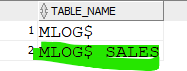
To see physical log table:
SELECT table_name
FROM dba_tables
WHERE table_name LIKE 'MLOG$%';
6. How It Works Internally
When DML occurs:
- Oracle writes changes to
MLOG$_SALES - During FAST REFRESH
- Oracle reads only changed rows
- Applies incremental updates
This significantly reduces refresh time.
Manual refresh:
EXEC DBMS_MVIEW.REFRESH('MV_SALES', 'F');
7. Drop Materialized View Log
DROP MATERIALIZED VIEW LOG ON sales;
8. Performance Considerations
* DML Overhead
MV Logs add:
- Additional redo
- Additional undo
- Extra writes
Heavy OLTP systems must evaluate impact.
* Index on MLOG Table
Usually Oracle creates required indexes automatically.
Do not manually modify internal MLOG tables.
9. Best Practices (19c Production)
- Always use
INCLUDING NEW VALUES - Prefer
WITH PRIMARY KEY - Limit logged columns
- Monitor
DBA_MVIEW_LOGS - Avoid MV logs on heavy OLTP tables unless necessary
10. Conclusion
Materialized View Logs in Oracle 19c are essential for:
- High-performance incremental refresh
- Data warehouse environments
- Replication scenarios
 Google+
 Facebook









