


In Oracle Database 19c, the Cost-Based Optimizer (CBO) determines the most efficient way to retrieve data from tables. These methods are called SQL access paths.
One of the most commonly used index access paths is the Index Range Scan. It occurs when Oracle retrieves multiple rows from an index within a specific range of values.
Unlike an Index Unique Scan, which returns only one row, an Index Range Scan can return one or many rows.
1. What is an Index Range Scan?
An Index Range Scan happens when Oracle scans a portion of an index to find rows that match a range condition or partial key condition.
Typical SQL conditions that trigger an Index Range Scan include:
><BETWEENLIKE- Equality on non-unique columns
Example query:
select salary from employees where employee_id<120;
Oracle may use an index on employee_id and scan only the relevant part of the index, rather than scanning the entire table.
2. Execution Plan Example
EXPLAIN PLAN SET statement_id = 'wadhah_sql_index_scan_range' FOR select salary from employees where employee_id<120;
Example output:
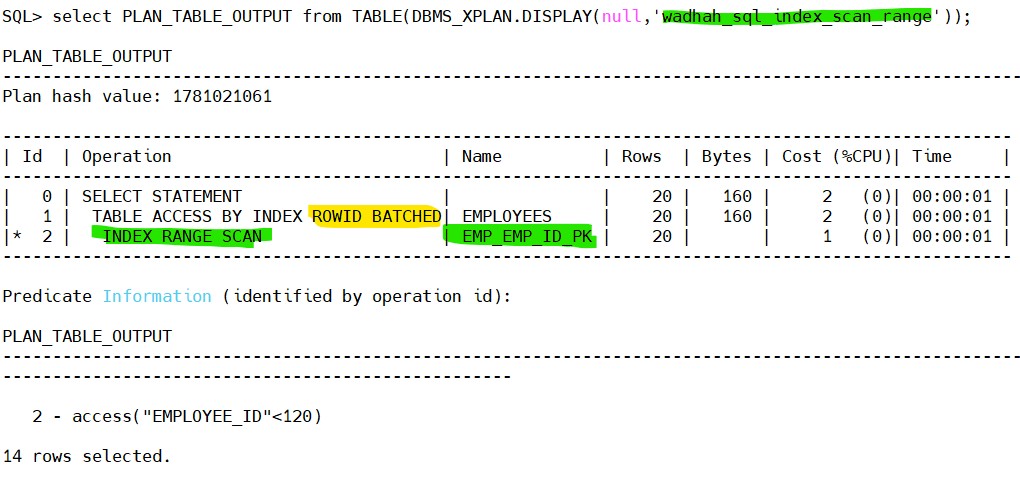
Explanation:
- Oracle scans the index range matching the condition.
- The index returns multiple ROWIDs.
- Oracle retrieves the rows from the table using ROWID access.
3. How Index Range Scan Works
The process follows these steps:
- Oracle navigates the B-tree index to locate the first matching value.
- It scans forward through the index leaf blocks.
- It collects ROWIDs for each matching entry.
- Oracle retrieves the rows from the table.
4. Performance Characteristics
Index Range Scan is efficient because:
- Only part of the index is scanned
- Avoids Full Table Scan
- Retrieves only relevant rows
However, if the query returns too many rows, Oracle may prefer a Full Table Scan.
 Google+
 Facebook









