


In Oracle Database 19c, the Cost-Based Optimizer (CBO) selects the best method to retrieve rows from a table. These methods are called SQL access paths.
One of the advanced index access paths is the Index Skip Scan. It allows Oracle to use a composite index even when the leading column of the index is not included in the query condition.
This feature helps Oracle avoid a Full Table Scan and still benefit from an existing index.
1. What is an Index Skip Scan?
An Index Skip Scan occurs when Oracle scans a composite index but skips the leading column values internally to find matching rows based on non-leading columns.
Example composite index:
SQL> create index emp_id_salary on employees (employee_id, salary);

Index created.

Elapsed: 00:00:00.05
Normally, this index works best when queries filter on salary, the leading column.
2. Execution Plan Example
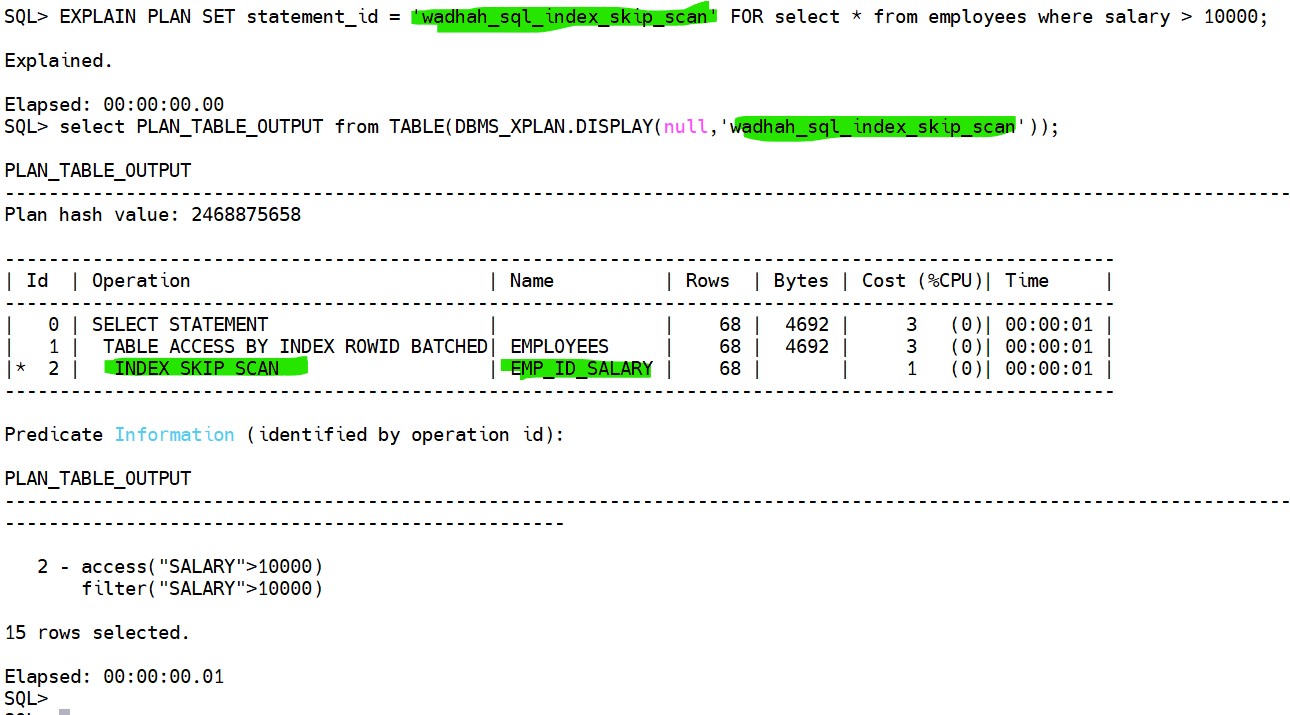
This indicates that Oracle uses the composite index while skipping the leading column values.
3. How Index Skip Scan Works
The process works internally as follows:
- Oracle identifies distinct values of the leading column.
- For each value, it searches the index using the non-leading column condition.
- Oracle combines the results to return matching rows.
4. When Oracle Uses Index Skip Scan
Oracle may choose Index Skip Scan in the following situations:
- Composite Index Exists
- Query Filters on Non-Leading Column
- Leading Column Has Low Cardinality
5. Performance Characteristics
Index Skip Scan characteristics:
- Uses composite indexes
- Avoids Full Table Scan
- Internally performs multiple range scans
- Works best when the leading column has low cardinality
However, if the leading column has many distinct values, the optimizer may prefer a Full Table Scan.
 Google+
 Facebook









