


A good news, starting from Oracle Database Appliance ODA 19.6, the Oracle Database Home (DB Home) is created on ACFS , so both of 2 noeuds have the same directory and same storage. As additional databases, patches, or diagnostic files accumulate, the DB Home may require more disk space.
This tutorial explains how to safely increase the storage allocated to a DB Home (From 30Go to 100Go).
Step 01: Check the current size DB Home, from any Node:
[root@wadhah-odax9-node01 ~]# odacli list-dbhome-storages

Note: The size of DBHome is 30G
Step 02: Resize to 100Go
[root@wadhah-odax9-node01 ~]# odacli modify-dbhome-storage -i 92970eee-336c-427e-8a45-f7793938eca0 -s 100
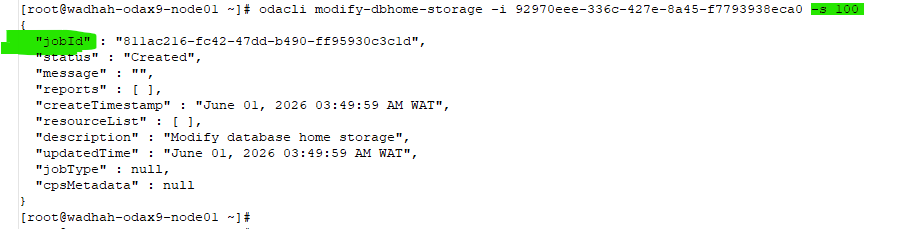
Step 03: Check the status of the resize/Monitor the Job
[root@wadhah-odax9-node01 ~]# odacli describe-job -i 811ac216-fc42-47dd-b490-ff95930c3c1d

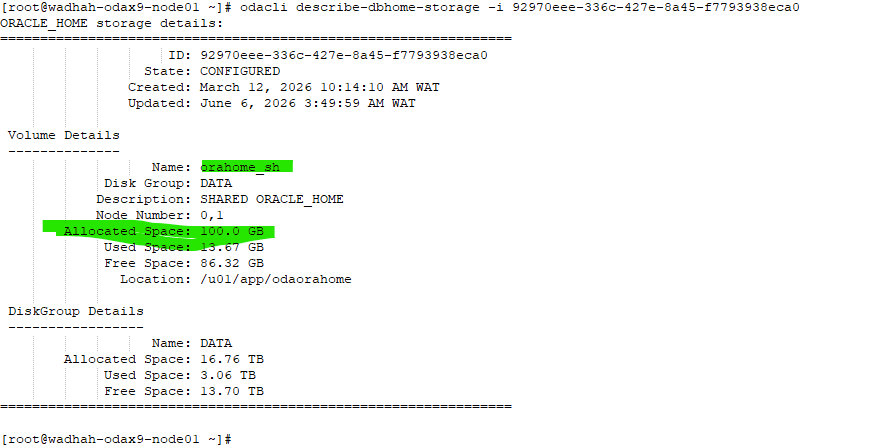
Step 04: Check the new size
[root@wadhah-odax9-node01 ~]# odacli describe-dbhome-storage -i 92970eee-336c-427e-8a45-f7793938eca0
Conclustion:
- Verify adequate free space in the ASM
DATAdisk group before starting. - Monitor the associated
odaclijob until it completes successfully.
 Google+
 Facebook









