


Reducing the Attack Surface: Oracle XML DB, JVM, HTTP Services, and Optional Components
A secure Oracle database is not only about strong passwords and encrypted data. It is also about minimizing the number of features that are exposed to users and applications.
Oracle Database includes many optional components that support different workloads, such as Java applications, XML processing, web services, multimedia, and spatial data. While these features are valuable when required, they should not remain enabled simply because they were installed by default.
During security assessments, one of my first tasks is to identify components that are installed but never used. In many cases, disabling or removing unnecessary features immediately reduces the database’s attack surface and simplifies future maintenance.
In this article, we’ll identify installed components, review common optional features, and discuss when they can be safely disabled.
What Is the Attack Surface?
The attack surface is the collection of services, features, and interfaces that could potentially be exploited.
Examples include:
- HTTP services
- Oracle XML DB
- Oracle JVM
- External procedures
- Unused database options
- Legacy features
The fewer unnecessary services running, the lower the overall security risk.
Step 1 – Review Installed Components
Start by identifying every Oracle component installed in the database.
COLUMN comp_name FORMAT A45
COLUMN version FORMAT A15
COLUMN status FORMAT A12

SELECT comp_name, version, status FROM dba_registry ORDER BY comp_name;
Typical output:
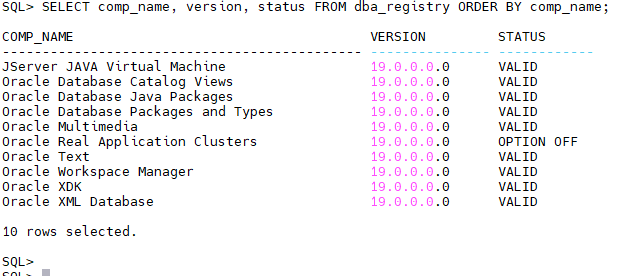
Review each component with the application owners before deciding whether it is still required.
Step 2 – Identify Installed Database Options
Oracle provides another view for installed options.
SELECT parameter, value FROM v$option ORDER BY parameter;
Example:
| Option | Value |
|---|---|
| Java | TRUE |
| XML DB | TRUE |
| Partitioning | TRUE |
| Label Security | FALSE |
A value of TRUE indicates that the feature is available, not necessarily that it is being used.
Step 3 – Review Oracle XML DB
Oracle XML DB (XDB) provides XML storage, XML indexing, WebDAV, FTP, and HTTP-based access to database resources.
Check whether XML DB is installed:
SELECT comp_name, status FROM dba_registry WHERE comp_name LIKE '%XML%';
If your applications use XMLTYPE, Oracle APEX, ORDS, or certain Oracle features, XML DB is likely required.
If XML DB is not used, review whether related services such as HTTP or FTP are enabled.
Step 4 – Review HTTP Services
Historically, Oracle XML DB could expose HTTP and FTP services.
Review the current HTTP port:
SELECT DBMS_XDB_CONFIG.GETHTTPPORT FROM dual;
Example:
8080
If the result is:
0
the HTTP service is disabled.
To disable HTTP:
BEGIN
   DBMS_XDB_CONFIG.SETHTTPPORT(0);
END;
/
Unless your environment requires HTTP access through XML DB, disabling it reduces unnecessary exposure.
Step 5 – Review Oracle JVM
Oracle JVM allows Java code to run inside the database.
Verify whether Java is installed:
SELECT parameter, value FROM v$option WHERE parameter='Java';
If Oracle JVM is not required by your applications or Oracle products, document that finding.
Removing Oracle JVM from an existing production database is a significant change and should only be considered after careful dependency analysis and testing.
Step 6 – Review External Procedures
External procedures allow PL/SQL to call native C libraries.
Review the listener configuration:
cat $ORACLE_HOME/network/admin/listener.ora
Look for entries similar to:
(ADDRESS=(PROTOCOL=IPC)(KEY=EXTPROC))
If external procedures are not used, review whether the EXTPROC configuration is still necessary.
Never remove it without confirming that no applications depend on it.
Step 7 – Review Oracle Directory Objects
Directory objects expose operating system directories to database users.
List all directory objects:
SELECT directory_name, directory_path FROM dba_directories ORDER BY directory_name;
Review each directory:
- Is it still required?
- Does it point to a valid location?
- Who has access?
Unused directory objects should be removed after validation.
Step 8 – Review UTL_FILE Access
Users granted access to directory objects may read or write files on the database server using UTL_FILE.
Review object grants:
COLUMN grantee FORMAT A25

SELECT grantee, table_name, privilege FROM dba_tab_privs WHERE table_name IN (SELECT directory_name FROM  dba_directories) ORDER BY grantee;
Ensure that only trusted accounts have access to sensitive directories.
Step 9 – Review Network ACLs
Packages such as UTL_HTTP, UTL_SMTP, and UTL_TCP require network ACLs.
List configured ACLs:
SELECT host, lower_port, upper_port FROM dba_host_acls ORDER BY host;
Review whether outbound network access is still justified.
Applications should only be allowed to communicate with approved external systems.
Step 10 – Document Every Optional Component
For every installed component, document:
- Why it exists.
- Which application uses it.
- Who owns it.
- Whether it is required.
- Whether it can be disabled.
Good documentation makes future upgrades, migrations, and security audits much easier.
Security Checklist
Before moving to the next chapter, verify that:
- Installed components have been reviewed.
- Unused HTTP services are disabled.
- Oracle JVM dependencies are documented.
- External procedures are reviewed.
- Directory objects are validated.
- Network ACLs are restricted.
- Optional features are documented.
Common Mistakes
The following issues are frequently identified during Oracle security reviews:
Leaving HTTP Enabled
Many databases expose an HTTP port that nobody knows is still active.
Removing Components Without Testing
Disabling or removing Oracle components without understanding application dependencies can cause unexpected outages.
Forgotten Directory Objects
Old directory objects often point to locations that no longer exist or are no longer controlled.
Excessive Network ACLs
Some environments allow outbound connections to any destination instead of limiting access to approved hosts.
Assuming “Installed” Means “Used”
Many Oracle components are installed by default but never used.
Always verify before making changes.
Performance Considerations
Reducing the attack surface is primarily a security objective, but it can also simplify database administration.
A smaller feature set means:
- Fewer components to patch.
- Simpler upgrades.
- Easier troubleshooting.
- Reduced configuration complexity.
The goal is not to remove every optional feature but to keep only those that provide business value.
Conclusion
A secure Oracle database is also a streamlined Oracle database. Every enabled feature should have a clear purpose and an identified owner.
Regularly reviewing installed components, optional services, and operating system integration points helps reduce unnecessary exposure while simplifying long-term maintenance.
Security is often improved not by adding more controls, but by removing features that are no longer needed.
 Google+
 Facebook









