


Securing Oracle Data Pump (expdp & impdp)
Oracle Data Pump is the preferred utility for exporting and importing Oracle database objects. It is widely used for backups, migrations, environment refreshes, upgrades, and data transfers.
Because Data Pump can export entire databases, schemas, or tables, it often contains the same sensitive information as the production database itself.
During security assessments, I frequently encounter dump files stored on shared file systems, directory objects accessible to too many users, or export jobs executed with highly privileged accounts.
In this article, we’ll review how to secure Data Pump operations, protect dump files, and reduce the risk of unauthorized access.
Why Data Pump Security Matters
A Data Pump export may include:
- Customer records
- Financial information
- Employee data
- Application schemas
- PL/SQL source code
- Database metadata
- Security configuration
If an attacker gains access to a dump file, they may be able to recreate part or all of your database in another environment.
Protecting Data Pump should therefore be part of every Oracle security strategy.
Step 1 – Review Directory Objects
Data Pump reads from and writes to Oracle directory objects.
List all configured directories:
SELECT directory_name, directory_path FROM dba_directories ORDER BY directory_name;
Example output:
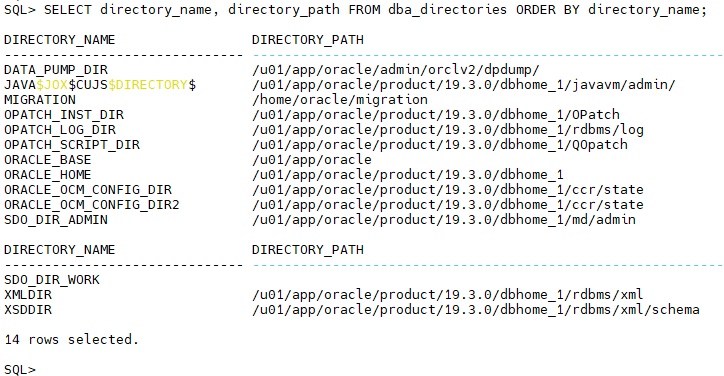
Verify that every directory:
- Exists on the server.
- Is still required.
- Is accessible only by authorized operating system users.
Step 2 – Review Directory Privileges
Directory access is controlled through object privileges.
Review who has access:
SELECT grantee, table_name AS directory_name, privilege FROM dba_tab_privs WHERE type='DIRECTORY' ORDER BY table_name, grantee;
Typical privileges include:
- READ
- WRITE
Avoid granting directory access to PUBLIC.
Grant access only to the accounts that perform Data Pump operations.
Example:
GRANT READ, WRITE ON DIRECTORY EXPORT_DIR TO EXPORT_USER;
Step 3 – Review Users with Data Pump Privileges
Oracle provides two powerful roles:
- DATAPUMP_EXP_FULL_DATABASE
- DATAPUMP_IMP_FULL_DATABASE
List users with these roles:
SELECT grantee, granted_role FROM dba_role_privs WHERE granted_role IN ('DATAPUMP_EXP_FULL_DATABASE','DATAPUMP_IMP_FULL_DATABASE') ORDER BY grantee;
Review whether each user genuinely requires these privileges.
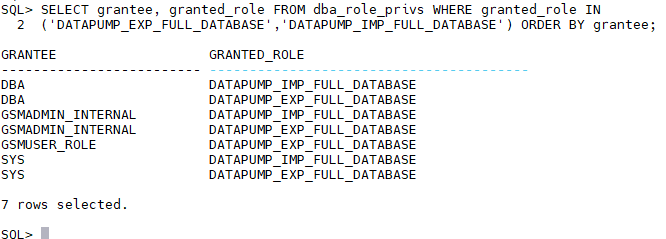
Avoid granting them to application accounts.
Step 4 – Protect Dump Files
Data Pump dump files should never be treated as ordinary files.
Review operating system permissions:
ls -lh /u01/app/oracle/admin/orclv2/dpdump
A poor configuration might look like:
-rwxrwxrwx export01.dmp
A more secure configuration:
chmod 700 /u01/app/oracle/admin/orclv2/dpdump

chown oracle:oinstall /u01/app/oracle/admin/orclv2/dpdump
Limit access to the Oracle software owner and authorized administrators.
Step 5 – Encrypt Data Pump Exports
Oracle Data Pump supports export encryption.
Example:
expdp system/password directory=EXPORT_DIR dumpfile=prod_%U.dmp full=y encryption=ALL encryption_password=StrongExportKey
Encryption options include:
- DATA_ONLY
- METADATA_ONLY
- ALL
For most production exports containing sensitive information, ENCRYPTION=ALL provides the highest level of protection.
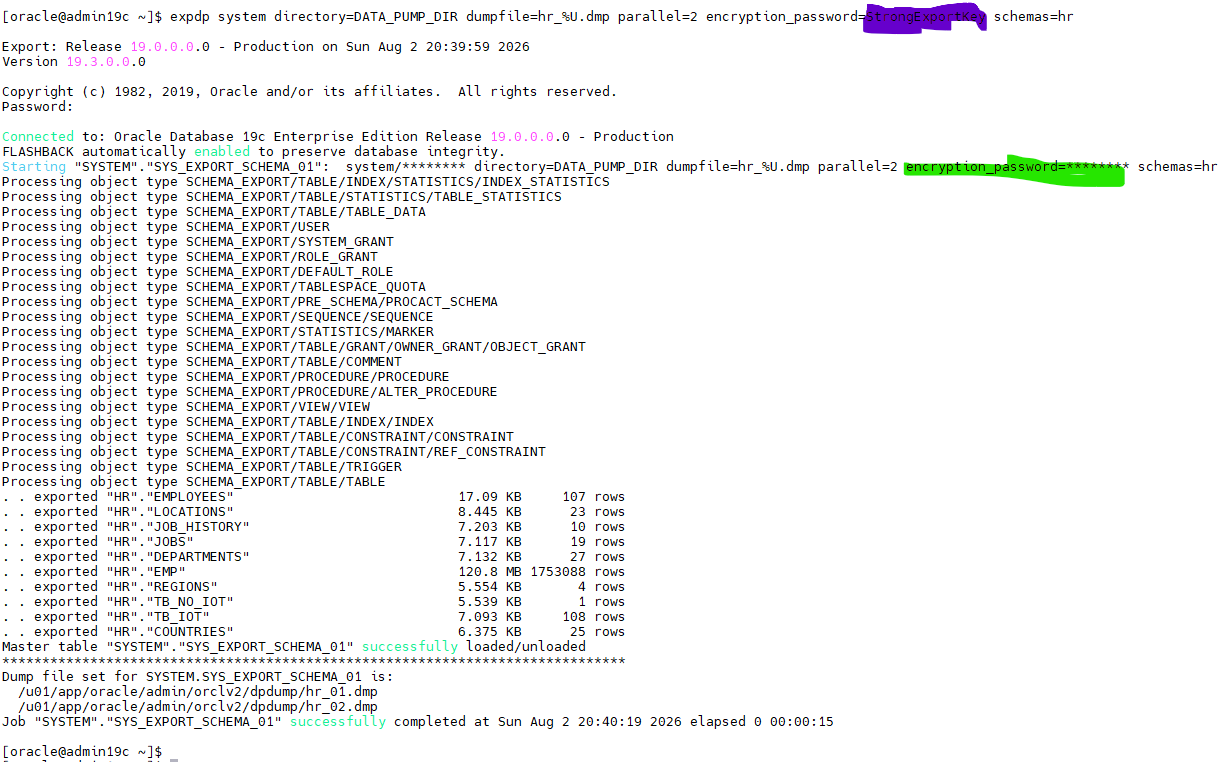
Step 6 – Verify Export Logs
Every Data Pump job generates a log file.
Review it carefully after each export.
Example:
cat export.log
Look for:
- Export errors
- Missing objects
- Permission problems
- Warnings
Do not assume that an export completed successfully simply because the command finished.
Step 7 – Monitor Active Data Pump Jobs
Review currently running export or import jobs:
COLUMN owner_name FORMAT A20
COLUMN job_name FORMAT A30
This helps identify:
- Long-running exports
- Abandoned jobs
- Unexpected Data Pump activity
Step 8 – Remove Old Dump Files
Old dump files often remain on disk for months or years.
Review export directories regularly:
find /u01/app/oracle/admin/orclv2/dpdump -type f -name "*.dmp"
Ask:
- Is this export still required?
- Has it been archived?
- Can it be securely deleted?
Retention policies should include dump files as well as RMAN backups.
Step 9 – Secure Data Transfers
Data Pump exports are often copied to:
- Backup servers
- Development environments
- Cloud storage
- Customer sites
Always use secure transfer methods such as:
- SCP
- SFTP
- HTTPS
Avoid:
- FTP
- Shared public folders
- Unencrypted email attachments
The security of the export must be maintained throughout its lifecycle.
Step 10 – Audit Data Pump Activity
Review who has executed Data Pump jobs.
You can audit:
- Export operations
- Import operations
- Directory privilege changes
- Role grants
Unified Auditing, covered in Part 6 of this series, provides an effective way to monitor these activities.
Regular reviews help identify unauthorized exports before they become a security incident.
Security Checklist
Before moving to the next chapter, verify that:
- Directory objects are reviewed regularly.
- Directory privileges follow the principle of least privilege.
- Data Pump administrative roles are restricted.
- Dump files have secure operating system permissions.
- Sensitive exports are encrypted.
- Export logs are reviewed.
- Old dump files are removed according to policy.
- Data transfers use secure protocols.
- Data Pump activity is audited.
Common Mistakes
The following issues are frequently identified during Oracle security assessments:
Dump Files Left on Shared Storage
Sensitive exports remain accessible long after they are needed.
Excessive Directory Privileges
Granting READ and WRITE access to unnecessary users increases the risk of unauthorized exports.
Unencrypted Exports
An exported database is still a copy of production data and should be protected accordingly.
Forgotten Export Files
Temporary exports created during upgrades or migrations often remain on the server indefinitely.
Data Pump Roles Granted Too Broadly
Only trusted administrators should have full Data Pump privileges.
Performance Considerations
Large exports can consume significant CPU, I/O, and storage bandwidth.
Before running production exports:
- Schedule them during maintenance windows when possible.
- Use
PARALLELcarefully to balance performance with available system resources. - Ensure that the export directory has sufficient free space.
- Monitor archive log generation for large export operations.
Security measures such as encryption add a small amount of overhead, but the protection they provide is generally well worth the cost.
Conclusion
Oracle Data Pump is an indispensable tool for database administration, but every export should be treated as a sensitive copy of your production environment.
By securing directory objects, limiting administrative privileges, encrypting exports, protecting dump files, and auditing Data Pump activity, you significantly reduce the risk of data leakage during migrations, backups, and routine administration.
Good Data Pump security is not just about creating exports—it’s about protecting them from the moment they are generated until they are securely deleted.
 Google+
 Facebook









