


In mission-critical systems running on Oracle Database 19c, accidental updates are common — especially salary adjustments, bulk modifications, or incorrect WHERE clauses.
Fortunately, Flashback Query allows you to retrieve past data without restoring backups and without modifying current data.
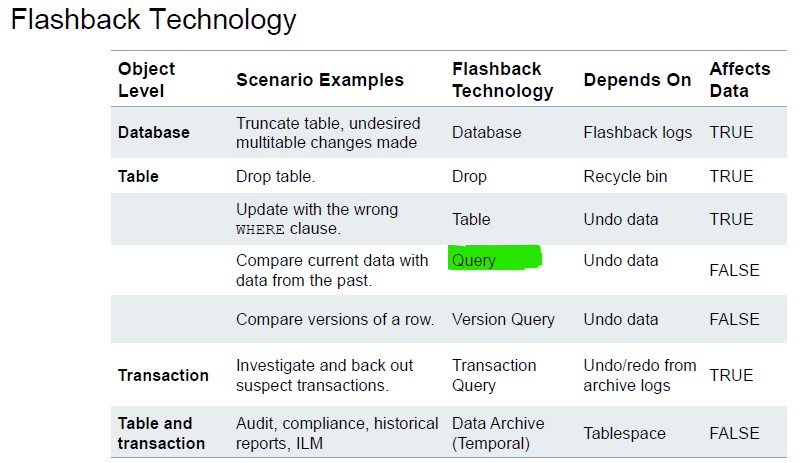
This article demonstrates a real example using Flashback Query with AS OF TIMESTAMP.
1. Scenario: Accidental Salary Increase
An administrator updates an employee’s salary and commits the change. Later, they need to verify the previous value.
Step 1 – Check Current Timestamp
SQL> select systimestamp from dual;
SYSTIMESTAMP
---------------------------------------------------------------------------
15/08/25 01:05:10.333965 PM +01:00
This timestamp is important because Flashback Query works based on UNDO retention and time reference.
Step 2 – Verify Original Salary
SQL> select salary from employees where employee_id=160;
SALARY
----------
      7500
The employee (ID = 160) currently earns 7500.
Step 3 – Perform Salary Update
SQL> update employees
     set salary = salary * 1.15
     where employee_id = 160;
1 row updated.
SQL> commit;
Commit complete.
Salary increased by 15%.
Step 4 – Verify Updated Salary
SQL> select salary from employees where employee_id=160;
SALARY
----------
      8625
The new salary is 8625.
At this point, the original value (7500) appears lost.
Step 5 – Use Flashback Query to Retrieve Past Value
Flashback Query allows us to query the table as it existed at a specific timestamp.
SQL> select salary
     from employees
     as of timestamp
     to_timestamp('15/08/25 13:05:00','dd/mm/yy hh24:mi:ss')
     where employee_id=160;
SALARY
----------
      7500
The previous salary 7500 is successfully retrieved.
2. How Flashback Query Works
Flashback Query:
- Uses UNDO data
- Requires sufficient
UNDO_RETENTION(Seconds) - Does NOT modify current data
- Works even after
COMMIT
It allows:
SELECT *
FROM table_name
AS OF TIMESTAMP <time>;
or
SELECT *
FROM table_name
AS OF SCN <scn_number>;
Check:
SHOW PARAMETER undo_retention;
3. Practical Use Cases
- Recovering accidentally updated rows
- Validating audit investigations
- Comparing before/after values
- Extracting previous data to reverse changes












Pingback: Oracle 19c Flashback Technology (2/7): Versions Query | Wadhah DAOUEHI