


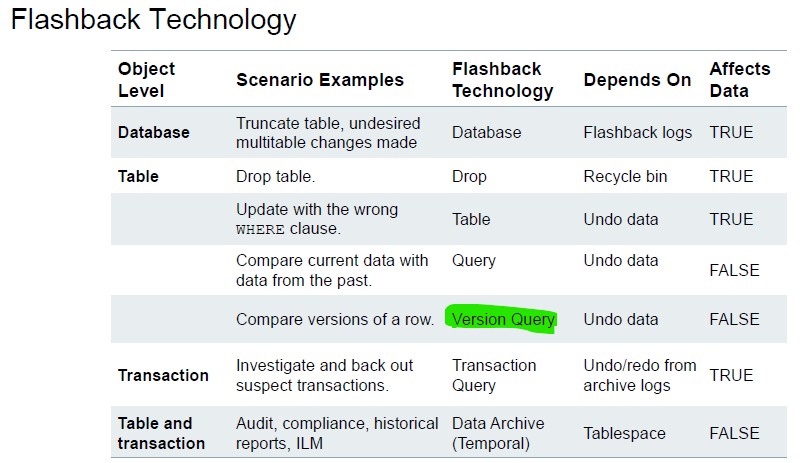
In Oracle Database 19c, when you don’t just want the old value at one moment—but instead want to see all historical versions of a row between two timestamps, you use:
VERSIONS BETWEEN TIMESTAMP ...
This feature is called Flashback Versions Query.
Step 1 – Check Current Timestamp
SQL> select systimestamp from dual;
SYSTIMESTAMP
---------------------------------------------------------------------------
15/08/25 01:05:10.333965 PM +01:00
This timestamp is important because Flashback Query works based on UNDO retention and time reference.
Step 2 – Verify Original Salary
SQL> select salary from employees where employee_id=160;
SALARY
----------
      7500
The employee (ID = 160) currently earns 7500.
Step 3 – Perform Salary Update
SQL> update employees
     set salary = salary * 1.15
     where employee_id = 160;
1 row updated.
SQL> commit;
Commit complete.
Salary increased by 15%.
Step 4 – Verify Updated Salary
SQL> select salary from employees where employee_id=160;
SALARY
----------
      8625
The new salary is 8625.
At this point, the original value (7500) appears lost.
Scenario – Salary Change Investigation
We previously updated employee 160:
- Old salary → 7500
- New salary → 8625
- Change committed
Now instead of retrieving only one past value (AS OF TIMESTAMP), we want to:
See all changes that happened to this row in a time window.
1. Syntax of VERSIONS BETWEEN
SELECT column_list,
       VERSIONS_STARTTIME,
       VERSIONS_ENDTIME,
       VERSIONS_OPERATION,
       VERSIONS_XID
FROM table_name
VERSIONS BETWEEN TIMESTAMP start_time AND end_time
WHERE condition;
2. Practical Example (Your Case)
SELECT salary,
       VERSIONS_STARTTIME,
       VERSIONS_ENDTIME,
       VERSIONS_OPERATION
FROM employees
VERSIONS BETWEEN TIMESTAMP
       TO_TIMESTAMP('15/08/25 13:00:00','DD-MM-RR HH24:MI:SS')
   AND TO_TIMESTAMP('15/08/25 13:10:00','DD-MM-RR HH24:MI:SS')
WHERE employee_id = 160;
3. Understanding Key Columns:
| Column | Meaning |
|---|---|
| VERSIONS_STARTTIME | When this version became valid |
| VERSIONS_ENDTIME | When this version ended |
| VERSIONS_OPERATION | I (Insert), U (Update), D (Delete) |
| VERSIONS_XID | Transaction ID |
4. Requirements
Flashback Versions Query requires:
- Automatic Undo Management
- Enough
UNDO_RETENTION - No need for Flashback Database
- No Recycle Bin required
Check retention:
SHOW PARAMETER undo_retention;
5. When to Use VERSIONS BETWEEN
- Audit row history
- Investigate who changed salary
- Track multiple updates
- Compliance investigation
- Debug application behavior
 Google+
 Facebook









