


Accidental table drops are one of the most common mistakes in production databases. Fortunately, Oracle 19c provides a Flashback Table feature that allows you to restore a dropped table instantly, without restoring from backups (From RecycleBin if it is ON). This article explains how it works, step by step, with an example.
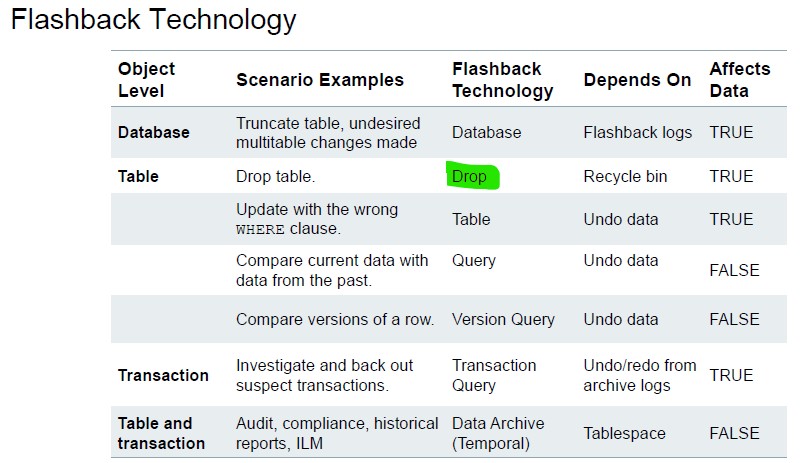
1. Scenario: Recovering a Dropped Table
Suppose we want to experiment with a new table, then realize we dropped it by mistake.
Step 1 – Create a Test Table
SQL> create table empv2 as select * from employees;Table created.
Check row count:
SQL> select count(*) from empv2;  COUNT(*)
----------
       107
Step 2 – Drop the Table
SQL> drop table empv2;
Now, if you try to query the table:
SQL> select count(*) from empv2;ERROR at line 1:
ORA-00942: table or view does not exist
The table is gone — but not permanently. Oracle moved it to the Recycle Bin.
Step 3 – Inspect the Recycle Bin
SQL> show recyclebin;
ORIGINAL NAME    RECYCLEBIN NAME                OBJECT TYPE  DROP TIME
---------------- ------------------------------ ------------ -------------------
EMPV2            BIN$S/iDQ9DVLjzgY744qMAVvQ==$0 TABLE        2025-08-21:10:44:51
BIN$…is Oracle’s internal Recycle Bin name.- Data is still available:
SQL> select count(*) from "BIN$S/iDQ9DVLjzgY744qMAVvQ==$0";
COUNT(*)
----------
       107
Step 4 – Restore the Dropped Table
Use Flashback Table to recover:
SQL> flashback table empv2 to before drop;
Flashback complete.
Now the table exists again:
SQL> select count(*) from empv2;
COUNT(*)
----------
       107
Note: All rows are intact. Flashback Table restores both the table and its data.
2. How Flashback Table Works
- Works only if Recycle Bin is enabled (default in Oracle 19c)
select value from v$parameter where name ='recyclebin';
VALUE
--------------------------------------------------------------------------------
on
- Recovers the table to its exact state at drop time
- Restores dependent objects like indexes automatically (but not triggers or grants in some versions)
- Uses UNDO data and Recycle Bin metadata
3. Key Notes
| Feature | Description |
|---|---|
| Flashback Table | Restores a dropped table from Recycle Bin |
| Requirements | Recycle Bin enabled, sufficient UNDO space |
| Command | FLASHBACK TABLE table_name TO BEFORE DROP; |
| Limitations | Cannot recover if table was dropped with PURGE |
4. Advanced Tips
- Check original object names: SELECT original_name, type, droptime FROM user_recyclebin;
- Purging tables: DROP TABLE empv2 PURGE; — permanently removes table
5. Why This Is Powerful
- No downtime
- Fast recovery
- Avoids restoring backups for simple mistakes
- Essential for production DBAs to prevent data loss
 Google+
 Facebook









