


Accidental bulk updates are a common problem in production databases. In this example, we’ll explore how to recover a table after mistakenly increasing salaries by 51% instead of the intended 15% using Oracle 19c Flashback Table.
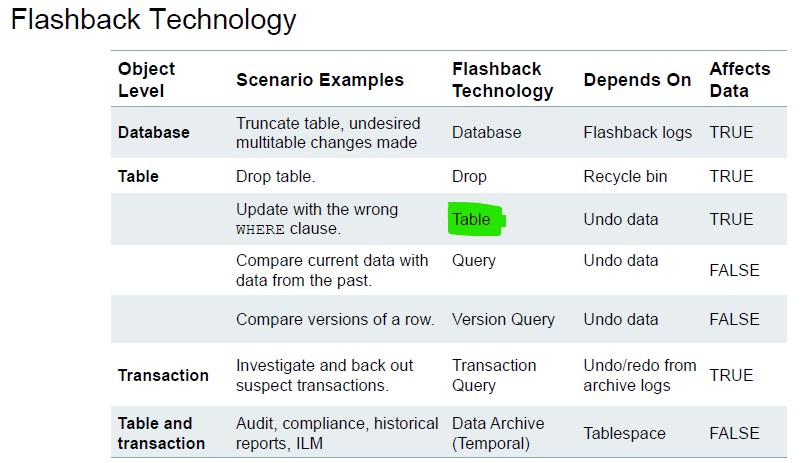
The duration depends on several factors, because Oracle reconstructs the table using UNDO data (UNDO_RETENTION) and row movement tracking.
1. Scenario
- Table:
empv2(107 employees) - Goal: Increase salaries by 15%
- Mistake: Updated salaries by 51%
We want to undo the accidental update without restoring from backups.
Step 1 – Check Current Table State
SQL> select count(*) from empv2;  COUNT(*)
----------
       107SQL> select systimestamp from dual;SYSTIMESTAMP
---------------------------------------------------------------------------
23/08/25 04.09.07.032465 PM +01:00
Step 2 – Accidental Bulk Update
SQL> update empv2 set salary = salary * 1.51;
107 rows updated.
SQL> commit;
Commit complete.
All salaries are now 51% higher, which was a mistake.
Step 3 – Attempt Flashback Table
SQL> flashback table empv2 to timestamp
     to_timestamp('23/08/25 16.09.00','dd/mm/yy hh24.mi.ss');
Result:
ORA-08189: cannot flashback the table because row movement is not enabled
Note: Flashback Table to a timestamp requires ROW MOVEMENT enabled because Oracle needs to track rowids changes .
Step 4 – Enable Row Movement
SQL> alter table empv2 enable row movement;
Table altered.
ROW MOVEMENTallows Oracle to relocate rows internally to maintain historical versions.- Required for Flashback operations that go back in time.
Step 5 – Flashback Table to Correct Timestamp
SQL> flashback table empv2 to timestamp
     to_timestamp('23/08/25 16.09.00','dd/mm/yy hh24.mi.ss');
Flashback complete.
- Salaries are restored to their correct state before the accidental update.
- No data is lost; only the change made in error is undone.
2. Key Takeaways
| Step | Concept |
|---|---|
| Accidental update | Bulk change can be quickly undone with Flashback Table |
| ORA-08189 | Row movement must be enabled to flashback table to timestamp |
ALTER TABLE ... ENABLE ROW MOVEMENT | Prepares table for Flashback |
| Flashback Table | Restores table to a specific point in time |
3. Best Practices
- Always enable ROW MOVEMENT on tables where Flashback might be needed:
ALTER TABLE empv2 ENABLE ROW MOVEMENT;
- Check timestamps carefully to avoid flashing back to the wrong moment.
- Test Flashback in a non-production environment before using it on live tables.
- Consider Flashback Query for auditing:
SELECT *
FROM empv2 AS OF TIMESTAMP
to_timestamp('23/08/25 16.09.00','dd/mm/yy hh24.mi.ss');
This allows you to inspect old data without changing the table.
4. Summary
- Flashback Table can undo committed mistakes.
- ROW MOVEMENT is mandatory for timestamp-based flashback.
- No backup restore is required — recovery is instant and safe.
- Works perfectly for accidental bulk updates like salary changes.
 Google+
 Facebook









