


In Oracle Database 19c, Flashback Database allows you to rewind your database to a previous point in time — without restoring backups.
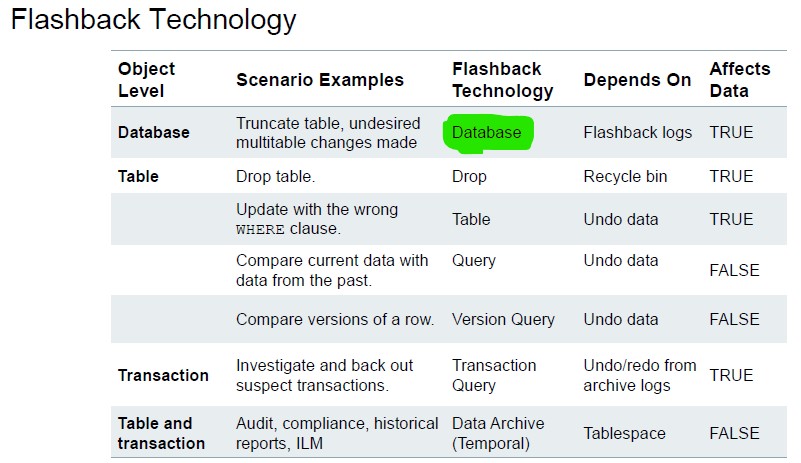
With the Multitenant architecture (CDB/PDB), Flashback can be performed:
- At CDB level
- At PDB level (independently)
This article explains configuration, and practical examples for Flashback Database on a PDB.
1. What is Flashback Database?
Flashback Database allows you to:
- Rewind the database to a past SCN or timestamp
- Recover from logical errors (accidental delete, update, drop, etc.)
- Avoid full restore + recovery
It works using:
- Flashback Logs (stored in FRA)
- UNDO
- Redo logs
2. Flashback in Multitenant (CDB/PDB)
In 19c:
| Level | Supported | Notes |
|---|---|---|
| CDB | Yes | All PDBs are flashed back |
| Individual PDB | Yes | Since 12.2+ |
| Single table | Use Flashback Table instead |
Important: Flashback Database is different from Flashback Table.
3. Prerequisites
Step 1 – Enable ARCHIVELOG
SHUTDOWN IMMEDIATE;
STARTUP MOUNT;
ALTER DATABASE ARCHIVELOG;
ALTER DATABASE OPEN;
Step 2 – Configure FRA
ALTER SYSTEM SET DB_RECOVERY_FILE_DEST_SIZE = 20G;
ALTER SYSTEM SET DB_RECOVERY_FILE_DEST = '/u01/app/oracle/fast_recovery_area';
Step 3 – Enable Flashback at CDB Level (Not at PDB Level)
SHUTDOWN IMMEDIATE;
STARTUP MOUNT;
ALTER DATABASE FLASHBACK ON;
ALTER DATABASE OPEN;
Verify:
SELECT flashback_on FROM v$database;
Should return:
YES
4. How Far Back Can You Go?
Depends on:
- FRA size
- Flashback retention target
SHOW PARAMETER db_flashback_retention_target;
Default:
1440 minutes (24 hours)
Increase if needed:
ALTER SYSTEM SET db_flashback_retention_target = 2880;
5. Flashback PDB
sqlplus sys/oracle_4U@pdb as sysdba
Connected to:
Oracle Database 19c Enterprise Edition
Version 19.3.0.0.0
Step 1. – Close the PDB
Flashback requires the PDB to be closed.
SQL> ALTER PLUGGABLE DATABASE pdb CLOSE immediate;
Pluggable database altered.
Step 2 – Flashback PDB to Timestamp
We rewind to the timestamp captured before the update:
SQL> FLASHBACK PLUGGABLE DATABASE pdb
     TO TIMESTAMP TO_TIMESTAMP('03/09/25 18:30:20','dd/mm/yy hh24:mi:ss');
Output:
Flashback complete.
Oracle restored the PDB to the exact moment before the update.
Step 3 – Open PDB with RESETLOGS
SQL> ALTER PLUGGABLE DATABASE pdb OPEN RESETLOGS;
Pluggable database altered.
RESETLOGS is mandatory after Flashback Database.
 Google+
 Facebook









