


When working with Flashback Transaction Query in Oracle 19c, retrieving the UNDO_SQL column is essential if you want to reverse DML operations (INSERT, UPDATE, DELETE) manually.
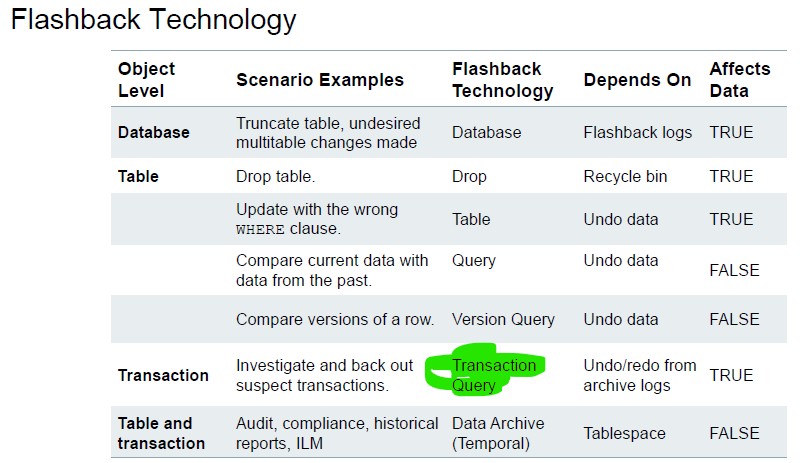
This article explains:
- What
FLASHBACK_TRANSACTION_QUERYis - Why
UNDO_SQLmay not appear - How to enable the required logging
- How to correctly retrieve
UNDO_SQL - Troubleshooting tips
1. What is FLASHBACK_TRANSACTION_QUERY?
FLASHBACK_TRANSACTION_QUERY is a data dictionary view that shows historical transaction information stored in UNDO.
It provides:
XID(Transaction ID)START_TIMESTAMPCOMMIT_TIMESTAMPOPERATION(INSERT/UPDATE/DELETE)TABLE_NAMEUNDO_SQL(SQL to reverse the change)
This feature depends on:
- UNDO retention
- Supplemental logging
- Sufficient UNDO data still available
2. Why UNDO_SQL May Be NULL or Not Displayed
Common causes:
2.1. Supplemental logging not enabled
Without supplemental logging, Oracle does not log enough information to reconstruct the undo statement.
2.2. UNDO data aged out
If UNDO_RETENTION is too small, the undo information may be overwritten.
2.3. Querying wrong user / PDB
In multitenant (CDB/PDB), you must query inside the correct PDB.
3. Enable Supplemental Logging (Required on CDB$ROOT in CDB/PDB)
To retrieve proper UNDO_SQL, enable supplemental logging at database level:
select supplemental_log_data_min from v$database;
NO

ALTER DATABASE ADD SUPPLEMENTAL LOG DATA;
To verify:
SELECT supplemental_log_data_min FROM v$database;
It should return:
YES
4. Example Scenario
We update an employee salary and commit.
Step 1 – Check Original Salary
SQL> select salary from empv3 where employee_id=100;
SALARY
----------
     24003
Step 2 – Perform UPDATE
SQL> update empv3 set salary = salary*1.15 where employee_id=100;
1 row updated.
SQL> commit;
Commit complete.
Step 3 – Verify New Salary
SQL> select salary from empv3 where employee_id=100;
SALARY
----------
  27603.45
Now we want to reverse this change using FLASHBACK_TRANSACTION_QUERY.
5. Important Requirements Checklist
| Requirement | Check Command |
|---|---|
| Supplemental Logging | SELECT supplemental_log_data_min FROM v$database; |
| UNDO Retention | SHOW PARAMETER undo_retention |
| Enough UNDO Space | SELECT tablespace_name, bytes FROM dba_data_files WHERE tablespace_name LIKE '%UNDO%'; |
| Correct PDB | SHOW CON_NAME; |
6. UNDO_SQL Is Still not NULL
Check the result of the
SELECT distinct xid, operation, logon_user, start_timestamp, commit_timestamp,  undo_sql FROM flashback_transaction_query WHERE table_name = 'EMPV3' ORDER BY commit_timestamp DESC;

XID              OPERATION                        LOGON_USER START_TIMESTAMP     COMMIT_TIMESTAMP
---------------- -------------------------------- ---------- ------------------- -------------------
UNDO_SQL
-----------------------------------------------------------------------------
08001E00B6030000  UPDATE   HR  01-09-2025 17:37:31  01-09-2025 17:37:34
update "HR"."EMPV3" set "SALARY" = '24003' where ROWID = 'AAAR4uAAEAAAKbrAAA';

0900210055030000  UNKNOWN  HR  01-09-2025 17:33:13  01-09-2025 17:33:43
7. Summary
To retrieve UNDO_SQL:
- Enable supplemental logging
- Ensure UNDO retention is sufficient
- Query
FLASHBACK_TRANSACTION_QUERY - Filter
UNDO_SQL IS NOT NULL - Make sure you’re in the correct PDB
 Google+
 Facebook









