


Strengthening Authentication and Password Security
One of the most common misconceptions is that Oracle security begins with encryption or auditing. In reality, security starts much earlier—with user authentication.
A strong firewall cannot protect a database if users authenticate with weak passwords. Likewise, auditing provides little value if unauthorized users can easily gain access.
Oracle provides a comprehensive password management framework through profiles, allowing DBAs to enforce password complexity, account lockout policies, password expiration, and password reuse restrictions.
In this article, we’ll review these features and learn how to implement a password policy suitable for production environments.
Why Password Policies Matter
During security assessments, I frequently encounter databases where password policies have never been reviewed after installation.
Typical findings include:
- Unlimited failed login attempts
- Passwords that never expire
- No password complexity checks
- Shared administrative accounts
- Dormant accounts that remain enabled
These settings may simplify administration, but they also increase the risk of unauthorized access.
A good password policy reduces that risk while remaining practical for database administrators and application owners.
Step 1 – Review Existing Profiles
Oracle stores password policies inside database profiles.
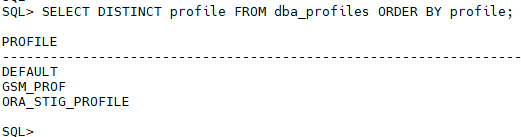
To see which profiles are available:
SELECT DISTINCT profile FROM dba_profiles ORDER BY profile;
Example output:
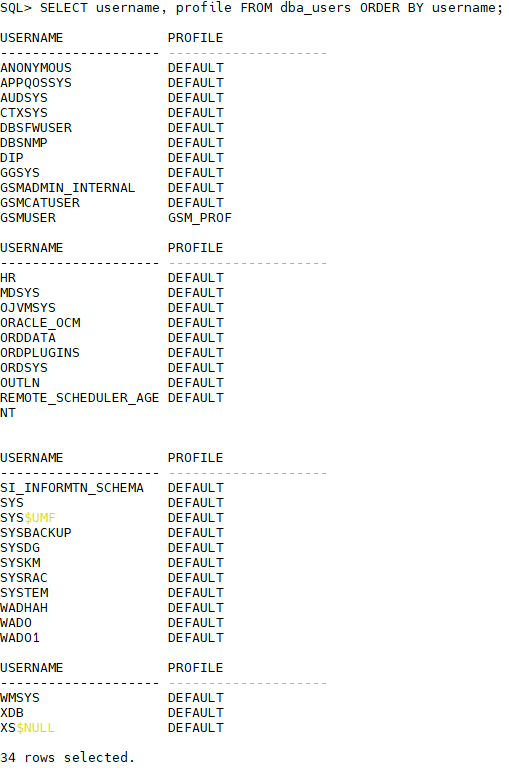
Next, identify which profile is assigned to each user.
SELECT username, profile FROM dba_users ORDER BY username;
You’ll often find that most accounts still use the DEFAULT profile.
Step 2 – Review Password Parameters
Let’s inspect the current password policy.
SELECT resource_name, limit FROM dba_profiles WHERE profile='DEFAULT' AND resource_type='PASSWORD' ORDER BY resource_name;
Example output:
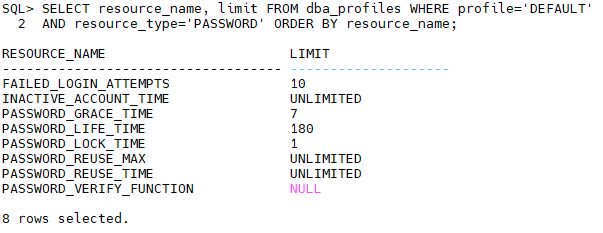
At first, these values may seem acceptable. However, notice that no password verification function is configured. This means Oracle is not enforcing password complexity.
Step 3 – Check Password Versions
Oracle 19c supports modern password versions while still allowing compatibility with older clients.
Run the following query:
SELECT username, password_versions FROM dba_users ORDER BY username;
Example output:
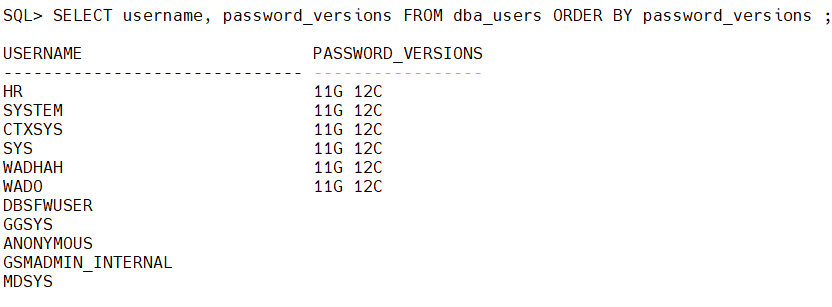
Why does this matter?
If users still have 10G password versions, older and less secure password hashes are retained.
Ideally, production databases should use only modern password versions unless legacy client compatibility is required.
Step 4 – Identify Accounts That Never Expire
Expired passwords improve security, but not every account should expire.
Application service accounts often require different policies than interactive user accounts.
Review account status:
SELECT username, account_status, expiry_date FROM dba_users ORDER BY username;
Questions to ask:
- Should this account expire?
- Is this a service account?
- Is this account still used?
Step 5 – Identify Users Without Recent Logins
Inactive accounts frequently become forgotten security risks.
SELECT username, account_status, last_login FROM dba_users ORDER BY last_login NULLS FIRST;
If an account has not been used for months—or years—it should be reviewed.
Possible actions include:
- Locking the account
- Removing unnecessary privileges
- Dropping the account if it is no longer required
Step 6 – Configure a Secure Password Profile
Rather than modifying the DEFAULT profile directly, create a dedicated profile for production users.
CREATE PROFILE SECURE_PROFILE LIMIT
FAILED_LOGIN_ATTEMPTS 5
PASSWORD_LIFE_TIME 90
PASSWORD_GRACE_TIME 7
PASSWORD_REUSE_TIME 365
PASSWORD_REUSE_MAX 10
PASSWORD_LOCK_TIME 1/24
PASSWORD_VERIFY_FUNCTION ora12c_verify_function;
Let’s review these settings.
| Parameter | Description |
|---|---|
| FAILED_LOGIN_ATTEMPTS | Lock account after five failed logins |
| PASSWORD_LIFE_TIME | Password expires after 90 days |
| PASSWORD_GRACE_TIME | Seven-day warning before expiration |
| PASSWORD_REUSE_TIME | Prevent reuse within one year |
| PASSWORD_REUSE_MAX | Prevent reuse of recent passwords |
| PASSWORD_LOCK_TIME | Unlock automatically after one hour |
Step 7 – Assign the Profile
Once the profile has been tested, assign it to users.
ALTER USER HR PROFILE SECURE_PROFILE;

ALTER USER WADHAH PROFILE SECURE_PROFILE;
Avoid assigning production applications until compatibility testing has been completed.
Step 8 – Lock Unused Accounts
Unused accounts should not remain open indefinitely.
To lock an account:
ALTER USER WADHAH ACCOUNT LOCK;
To unlock it later:
ALTER USER WADHAH ACCOUNT UNLOCK;
Locking is generally preferable to dropping an account immediately because it preserves the schema while preventing access.
Step 9 – Avoid Shared Administrative Accounts
Another common finding is that several administrators share the same SYSTEM account.
Instead, create individual administrative accounts and grant only the privileges required for each role.
For example:
CREATE USER DBA_Wadhah IDENTIFIED BY "StrongPassword";
GRANT CREATE SESSION TO DBA_Wadhah;
GRANT SYSBACKUP TO DBA_Wadhah;
This improves accountability because every administrative action can be traced to a specific individual.
Security Checklist
Before moving on, verify the following:
- Password complexity is enforced.
- Failed login attempts are limited.
- Password reuse is restricted.
- Old password versions have been reviewed.
- Dormant accounts have been identified.
- Unused accounts are locked.
- Shared administrative accounts have been eliminated.
- Service accounts use appropriate profiles.
Common Mistakes
The following issues appear regularly during Oracle security reviews:
- Using the
DEFAULTprofile for every account. - Disabling password expiration without a valid reason.
- Leaving service accounts with unnecessary privileges.
- Keeping unused accounts unlocked.
- Sharing the
SYSTEMaccount among multiple administrators. - Forgetting to review password versions after client upgrades.
Avoiding these mistakes significantly improves the overall security of your Oracle environment.
Conclusion
Authentication is the foundation of database security. Even the best encryption and auditing strategies cannot compensate for weak passwords or poorly managed user accounts.
By implementing strong password policies, assigning appropriate profiles, and regularly reviewing user accounts, you can reduce one of the most common attack vectors against Oracle databases.
 Google+
 Facebook









