


Managing Privileges and Applying the Principle of Least Privilege
Giving users more privileges than they need is one of the most common security issues found during Oracle database assessments.
Over the years, I’ve seen application accounts granted the DBA role simply to avoid permission errors during deployment. While this may solve a short-term problem, it creates unnecessary security risks that can remain unnoticed for years.
The principle of least privilege is simple: every user should have only the permissions required to perform their job—nothing more.
In this article, we’ll review users, roles, and system privileges to identify excessive permissions and improve the overall security of the database.
Why Least Privilege Matters
Every additional privilege increases the potential impact of a compromised account.
For example, an application account that only needs to query customer data should never be able to:
- Drop tables
- Create database users
- Modify system parameters
- Read data from other application schemas
- Execute administrative packages
Reducing privileges doesn’t just improve security—it also reduces the chance of accidental changes in production.
Step 1 – Identify Users with the DBA Role
The DBA role provides extensive administrative privileges and should be granted only when absolutely necessary.
To list all users who have this role:
SELECT grantee, admin_option, default_role FROM dba_role_privs WHERE granted_role = 'DBA' ORDER BY grantee;
Example output:
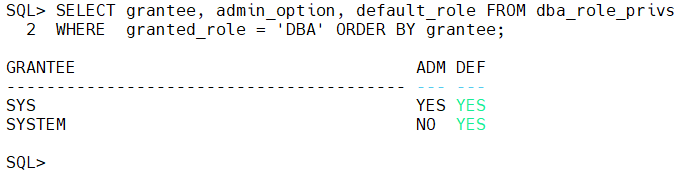
If you see application or reporting accounts in this list, review whether they genuinely require full administrative access.
Step 2 – Review System Privileges
Some users may not have the DBA role but still possess powerful system privileges.
Run the following query:
COL grantee FORMAT a25
COL privilege FORMAT a35

SELECT grantee, privilege FROM   dba_sys_privs ORDER BY grantee, privilege;
Pay close attention to privileges such as:
- ALTER SYSTEM
- ALTER DATABASE
- CREATE USER
- DROP USER
- CREATE ANY TABLE
- DROP ANY TABLE
- EXECUTE ANY PROCEDURE
- SELECT ANY TABLE
These privileges should always have a clear business justification.
Step 3 – Find ANY Privileges
Privileges with ANY deserve special attention because they apply across the database rather than to specific objects.
The following query highlights them:
SELECT grantee, privilege FROM dba_sys_privs WHERE privilege LIKE '%ANY%' ORDER BY grantee;
Typical results may include:
- SELECT ANY TABLE
- UPDATE ANY TABLE
- DELETE ANY TABLE
- EXECUTE ANY PROCEDURE
Granting these privileges to application accounts is rarely necessary and should be carefully reviewed.
Step 4 – Review Role Assignments
Roles make privilege management easier, but over time they can accumulate permissions that are no longer needed.
To review role assignments:
SELECT grantee, granted_role FROM dba_role_privs ORDER BY grantee;
Ask yourself:
- Is this role still required?
- Is it assigned to the correct users?
- Can it be replaced with a custom role?
Regular reviews help keep role assignments aligned with current responsibilities.
Step 5 – Audit PUBLIC Privileges
The PUBLIC role exists in every Oracle database. Any privilege granted to PUBLIC is automatically available to all users.
Review these grants with:
SELECT owner, table_name, privilege FROM dba_tab_privs WHERE grantee = 'PUBLIC' ORDER BY owner, table_name;
Oracle creates several required PUBLIC grants, but additional grants made by administrators should be reviewed and justified.
Step 6 – Check Object Privileges
Applications often require access to objects in another schema.
Instead of granting broad system privileges, grant access only to the required objects.
To review existing object privileges:
SELECT owner, table_name, privilege, grantee FROM dba_tab_privs ORDER BY owner, table_name;
This makes it easier to identify unnecessary or outdated permissions.
Step 7 – Create Custom Roles
Avoid granting individual privileges repeatedly to multiple users.
Instead, create a role that reflects a specific job function.
Example:
CREATE ROLE REPORTING_ROLE;

GRANT CREATE SESSION TO REPORTING_ROLE;

GRANT SELECT ON HR.EMPLOYEES TO REPORTING_ROLE;

GRANT SELECT ON HR.DEPARTMENTS TO REPORTING_ROLE;
Assign the role to users:
GRANT REPORTING_ROLE TO REPORT_Wadhah;
This approach simplifies administration and makes future audits easier.
Step 8 – Remove Unnecessary Privileges
When you identify permissions that are no longer needed, revoke them carefully.
Example:
REVOKE DBA FROM REPORT_Wadhah;
Or revoke a specific privilege:
REVOKE SELECT ANY TABLE FROM REPORT_Wadhah;
Always verify the impact in a test environment before making changes in production.
Step 9 – Monitor Administrative Accounts
Administrative accounts deserve additional attention.
The following query lists users with powerful administrative privileges:
SELECT * FROM v$pwfile_users;
Typical output:
| USERNAME | SYSDBA | SYSOPER | SYSBACKUP |
|---|---|---|---|
| SYS | TRUE | TRUE | TRUE |
| WADHAH | TRUE | FALSE | FALSE |
Review this list regularly and remove unnecessary administrative privileges.
Security Checklist
Before moving to the next chapter, verify that:
- Only authorized administrators have the
DBArole. ANYprivileges have been reviewed and justified.- Application accounts follow the principle of least privilege.
- PUBLIC grants have been audited.
- Custom roles are used where appropriate.
- Administrative accounts are reviewed regularly.
Common Mistakes
Some of the most frequent issues I encounter include:
- Granting the
DBArole to application accounts. - Using
SELECT ANY TABLEinstead of object-level grants. - Assigning multiple overlapping roles without periodic reviews.
- Forgetting to revoke privileges after projects or migrations.
- Granting permissions directly to users instead of through roles.
These shortcuts may save time during implementation, but they often create long-term security and maintenance challenges.
Conclusion
Privilege management is more than assigning roles—it’s about ensuring that every account has exactly the permissions it needs to perform its function.
A well-designed privilege model limits the impact of compromised accounts, simplifies audits, and reduces the risk of accidental changes in production.
 Google+
 Facebook









