


First Security Checks After Installation
In the previous article, we discussed why hardening is important and collected some basic information about the database. Now it’s time to perform the first security review.
These checks take only a few minutes, but they often reveal configuration issues that are common in newly installed databases.
1. Verify Default Administrative Accounts
One of the first tasks after an installation is identifying administrative accounts and checking their status.
Run the following query:
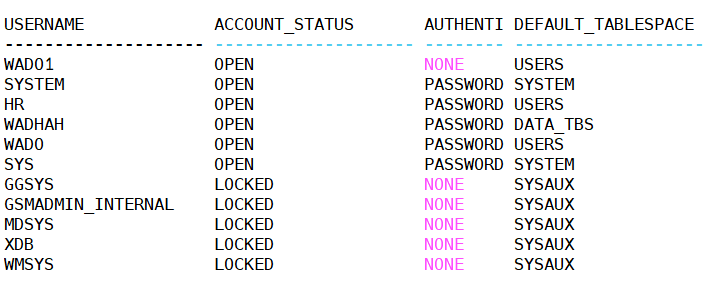
SELECT username, account_status, authentication_type, default_tablespace FROM dba_users ORDER BY username;
Look for accounts such as:
- SYS
- SYSTEM
- DBSNMP
- SYSMAN
- OUTLN
- XDB
- CTXSYS
- MDSYS
A typical output might look like this:
Why it matters
Oracle installs several predefined accounts. Some are required for database operation, while others are used only if specific components are enabled.
If a component isn’t used, consider locking its associated account after confirming there are no dependencies.
Tip: Never lock the
SYSaccount. Review each account carefully before making changes.
2. Identify Default Password Profiles
Password policies are your first line of defense against unauthorized access.
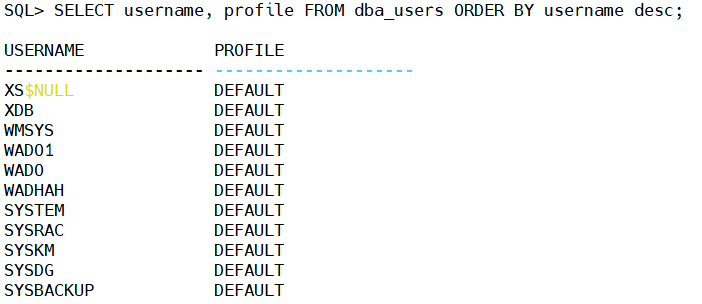
Check which profile is assigned to each user:
SELECT username, profile FROM dba_users ORDER BY username;
Most users will initially belong to the DEFAULT profile.
Now review the profile itself:
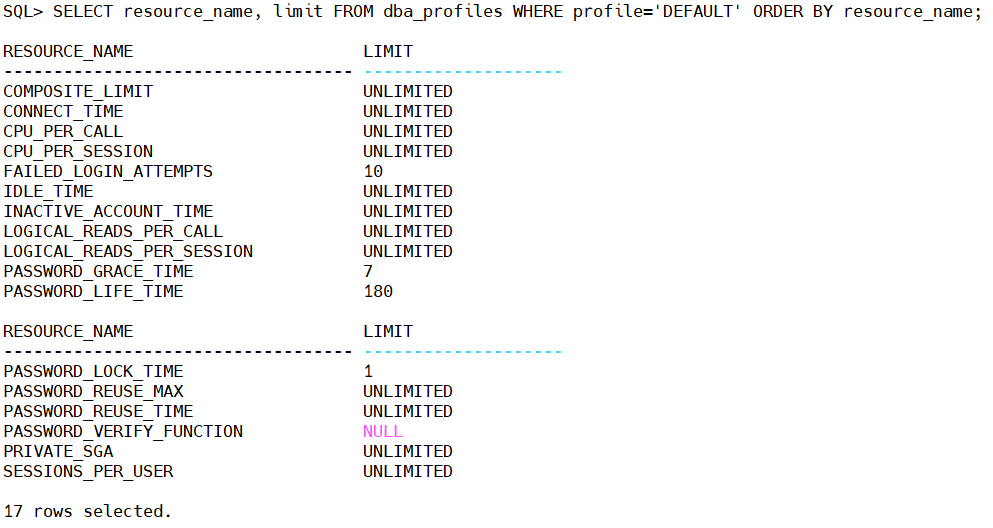
SELECT resource_name, limit FROM dba_profiles WHERE profile='DEFAULT' ORDER BY resource_name;
Pay special attention to:
- FAILED_LOGIN_ATTEMPTS
- PASSWORD_LIFE_TIME
- PASSWORD_GRACE_TIME
- PASSWORD_REUSE_TIME
- PASSWORD_VERIFY_FUNCTION
Example:
Why it matters
A NULL password verification function means Oracle does not enforce password complexity. Users could create weak passwords such as:
oracle
welcome1
password123
admin
A production database should always enforce strong password rules.
3. Find Users with DBA Privileges
This is one of the most important checks in any security assessment.
COLUMN grantee FORMAT A25

SELECT grantee FROM dba_role_privs WHERE  granted_role='DBA' ORDER BY grantee;
Example:
SYS
SYSTEM
DBSNMP
APPADMIN
Questions to ask
- Does this account really need DBA?
- Is it an application account?
- Is it still used?
- Can the privilege be replaced with a custom role?
One of the most common findings during security audits is application accounts that have been granted the DBA role simply because it solved a permission problem during development.
4. Review Powerful System Privileges
The DBA role isn’t the only concern. Some system privileges are equally powerful.
The following query identifies users who have privileges that allow broad access to the database:
SELECT grantee, privilege FROM dba_sys_privs WHERE privilege LIKE '%ANY%' ORDER BY grantee;
Watch for privileges such as:
- SELECT ANY TABLE
- DROP ANY TABLE
- ALTER ANY TABLE
- CREATE ANY PROCEDURE
- EXECUTE ANY PROCEDURE
These privileges should be granted only when absolutely necessary.
5. Check PUBLIC Grants
Every Oracle database contains the special PUBLIC role.
Privileges granted to PUBLIC are automatically available to every user.
Review them with:
SELECT owner, table_name, privilege FROM dba_tab_privs WHERE grantee='PUBLIC' ORDER BY owner,table_name;
Some grants are required by Oracle, but others may have been added over time.
Always review custom grants carefully.
6. Identify Unused or Dormant Accounts
Old accounts are easy to forget—and often easy to exploit.
The following query identifies users who haven’t logged in recently.
COLUMN username FORMAT A20

SELECT username, account_status, last_login FROM dba_users ORDER BY last_login;
Example:
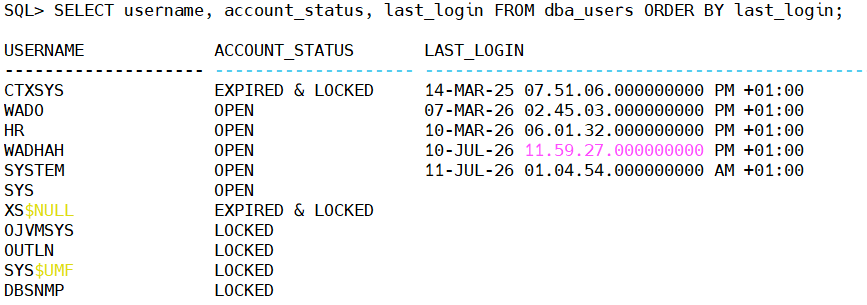
Questions to consider:
- Is this account still required?
- Should it be locked?
- Should it be removed?
Unused accounts increase the attack surface without providing any business value.
Security Checklist
Before moving to the next chapter, verify that you can answer “Yes” to the following questions:
- Are all default accounts reviewed?
- Are unnecessary accounts locked?
- Is a password policy enforced?
- Have DBA privileges been reviewed?
- Have powerful
ANYprivileges been justified? - Have
PUBLICgrants been audited? - Have inactive accounts been identified?
If the answer is No to any of these questions, you already have a clear starting point for improving the security of your Oracle environment.
Conclusion
Many security issues can be identified without changing a single database parameter. Simply reviewing user accounts, password policies, and privileges often uncovers risks that have existed for years.
In this article, we focused on assessing the security of users and privileges. In the next part, we’ll move to the network layer and secure the Oracle Listener and SQL*Net configuration. We’ll cover listener protection, node validation, network encryption, and connection auditing—essential steps for protecting your database from unauthorized network access.
 Google+
 Facebook









