


Introduction
If you’ve just installed Oracle Database 19c, your database is ready to use—but it isn’t necessarily ready for production.
A default installation is designed to get you up and running quickly. It includes sensible defaults that work well in many environments, but security is intentionally left flexible because every organization has different requirements.
As DBAs, it’s our responsibility to review these defaults and strengthen them before the database goes live.
Over the years, I’ve audited dozens of Oracle environments and found the same recurring issues:
- Default or weak password policies
- Excessive system privileges
- Unencrypted client connections
- Unused database components left enabled
- Auditing disabled or poorly configured
- Backups stored without encryption
- Listener configurations that expose unnecessary information
None of these issues are difficult to fix, but they are often overlooked until a security audit—or worse, a security incident.
In this series, we’ll walk through the process of hardening an Oracle Database 19c environment step by step. Every recommendation includes practical SQL queries, configuration examples, and validation steps that you can apply in your own environment.
The objective isn’t to make Oracle “unbreakable”—no system is—but to reduce the attack surface and follow Oracle security best practices.
Before You Start
Before changing any security settings, take a few minutes to understand the current state of your database.
A good security review always starts with a baseline. This allows you to document the existing configuration, compare results after each change, and quickly roll back if necessary.
Let’s begin with a few simple checks.
Step 1 – Check Your Oracle Version
The first thing I verify on any server is the exact Oracle version and Release Update (RU). Security fixes are delivered through RUs, so knowing your patch level is essential.
SELECT banner_full FROM v$version WHERE banner_full LIKE 'Oracle Database%';
Example output:

Why this matters
Two Oracle 19c databases may look identical but provide different security features depending on their Release Update. Always verify the version before reviewing security settings.
Step 2 – Review Installed Components
Oracle installs many optional components. Depending on your environment, some of them may never be used.
To see what’s installed:
SELECT comp_name, version, status FROM dba_registry ORDER BY comp_name;
Typical output:
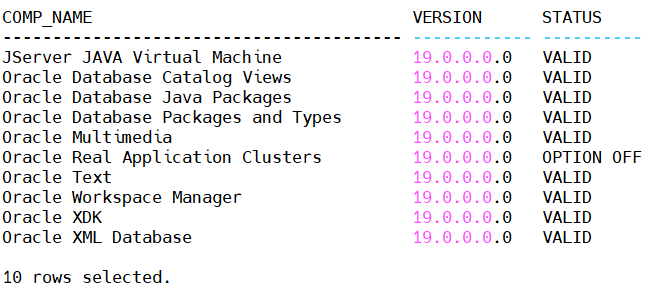
Don’t rush to remove components. Instead, identify which ones are actually required by your applications. Disabling unused features can reduce the attack surface and simplify future maintenance.
Step 3 – Verify the Database Role
If your environment uses Oracle Data Guard, make sure you’re connected to the correct database before making any changes.
SELECT name, database_role, open_mode FROM v$database;
Example:
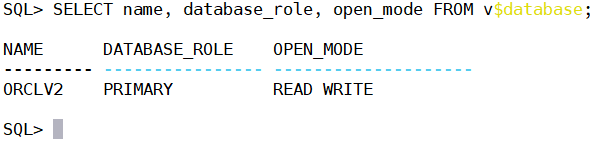
This simple check can prevent configuration changes from being applied to the wrong database.
Best Practices
Before you continue with any hardening activity:
- Create a backup or guaranteed restore point.
- Save copies of your
spfile,listener.ora, andsqlnet.ora. - Test changes in a non-production environment whenever possible.
- Record every change so it can be audited or rolled back later.
A few minutes spent preparing can save hours of troubleshooting.
 Google+
 Facebook









