


Securing Your Database with Unified Auditing
Imagine that someone creates a new user with DBA privileges at 2:00 AM.
The next morning, you’re asked a simple question:
Who created the account, when was it created, and from where?
Without auditing, you have no reliable answer.
Auditing isn’t just about meeting compliance requirements. It helps you understand what happened inside your database, investigate incidents, and monitor privileged activities.
Starting with Oracle Database 19c, Unified Auditing is the recommended auditing framework. It centralizes audit records in a single repository and offers better performance and flexibility than the traditional auditing methods.
In this article, we’ll verify whether Unified Auditing is enabled, create useful audit policies, and learn how to review audit records.
Understanding Unified Auditing
Before Unified Auditing, Oracle stored audit information in multiple locations depending on the feature being used.
With Unified Auditing, audit records are written to a single audit trail, making administration and reporting much easier.
Some common activities worth auditing include:
- User logins
- Failed login attempts
- User creation and deletion
- Privilege grants and revokes
- Changes to database configuration
- Sensitive DDL statements
- Administrative operations
The goal isn’t to audit everything. Instead, audit the events that help you detect suspicious or unauthorized activity.
Step 1 – Verify Unified Auditing
First, check whether Unified Auditing is enabled.
SELECT parameter, value FROM v$option WHERE parameter = 'Unified Auditing';
Example output:
| PARAMETER | VALUE |
|---|---|
| Unified Auditing | TRUE |
If the value is TRUE, the Unified Auditing is enabled.
Step 2 – Review Existing Audit Policies
Oracle provides several predefined audit policies.
To list them:
COLUMN policy_name FORMAT A35

SELECT policy_name,
       enabled_option
FROM   audit_unified_enabled_policies
ORDER BY policy_name;
Typical output:
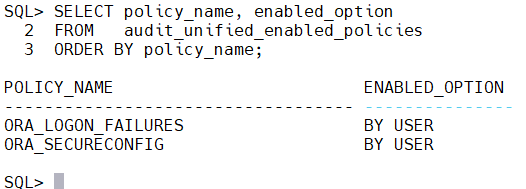
Review these policies before creating your own. In many environments, the predefined policies already cover common security events.
Step 3 – Audit User Management
Creating or modifying database users should always be audited.
Create a policy:
CREATE AUDIT POLICY audit_user_management
ACTIONS
    CREATE USER,
    ALTER USER,
    DROP USER;
Enable it:
AUDIT POLICY audit_user_management;
Now every user management operation will generate an audit record.
Step 4 – Audit Privilege Changes
Changes to roles and system privileges deserve the same level of attention.
CREATE AUDIT POLICY audit_privileges
ACTIONS
    GRANT,
    REVOKE;
Enable the policy:
AUDIT POLICY audit_privileges;
This allows you to track privilege changes over time.
Step 5 – Audit Logon Failures
Repeated login failures may indicate a password guessing attack or a misconfigured application.
Oracle provides a predefined policy for this purpose.
AUDIT POLICY ORA_LOGON_FAILURES;
Once enabled, failed authentication attempts are recorded automatically.
Step 6 – Review Audit Records
To view recent audit activity:
SELECT event_timestamp, dbusername, action_name, return_code
FROM   unified_audit_trail ORDER BY event_timestamp DESC;
Example output:
| Time | User | Action | Return Code |
|---|---|---|---|
| 19-JUL-26 09:42 | SYS | CREATE USER | 0 |
| 19-JUL-26 09:50 | WADHAH | LOGON | 1017 |
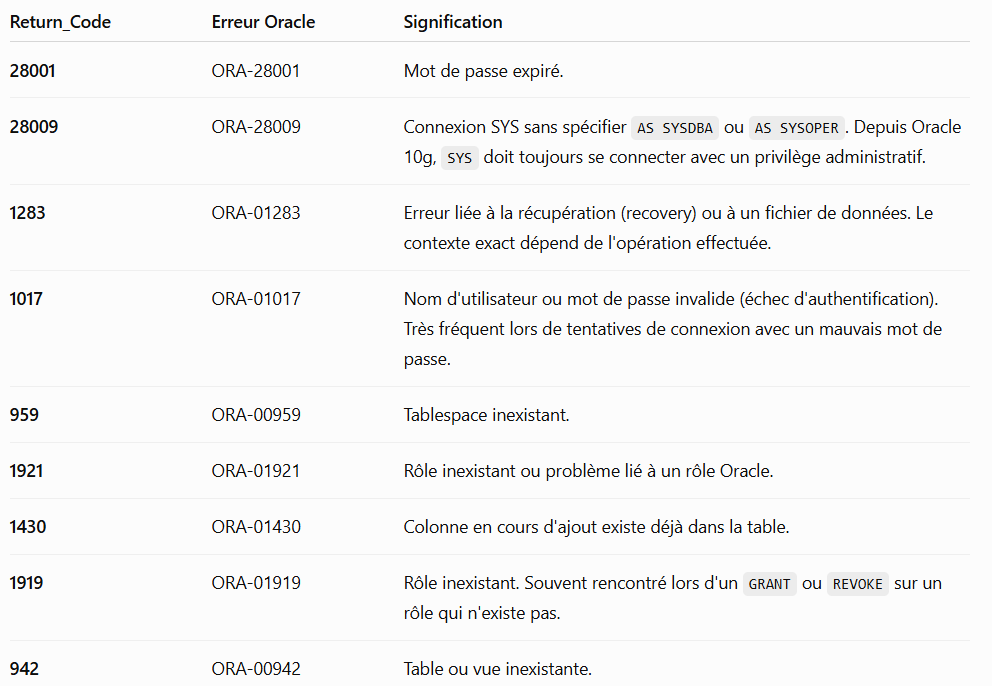
A return code of 0 indicates success. Oracle error codes, such as 1017, indicate failed operations.
Step 7 – Filter Failed Logins
Failed logins deserve special attention.
SELECT event_timestamp, dbusername, os_username, userhost, return_code
FROM   unified_audit_trail WHERE  return_code <> 0 ORDER BY event_timestamp DESC;
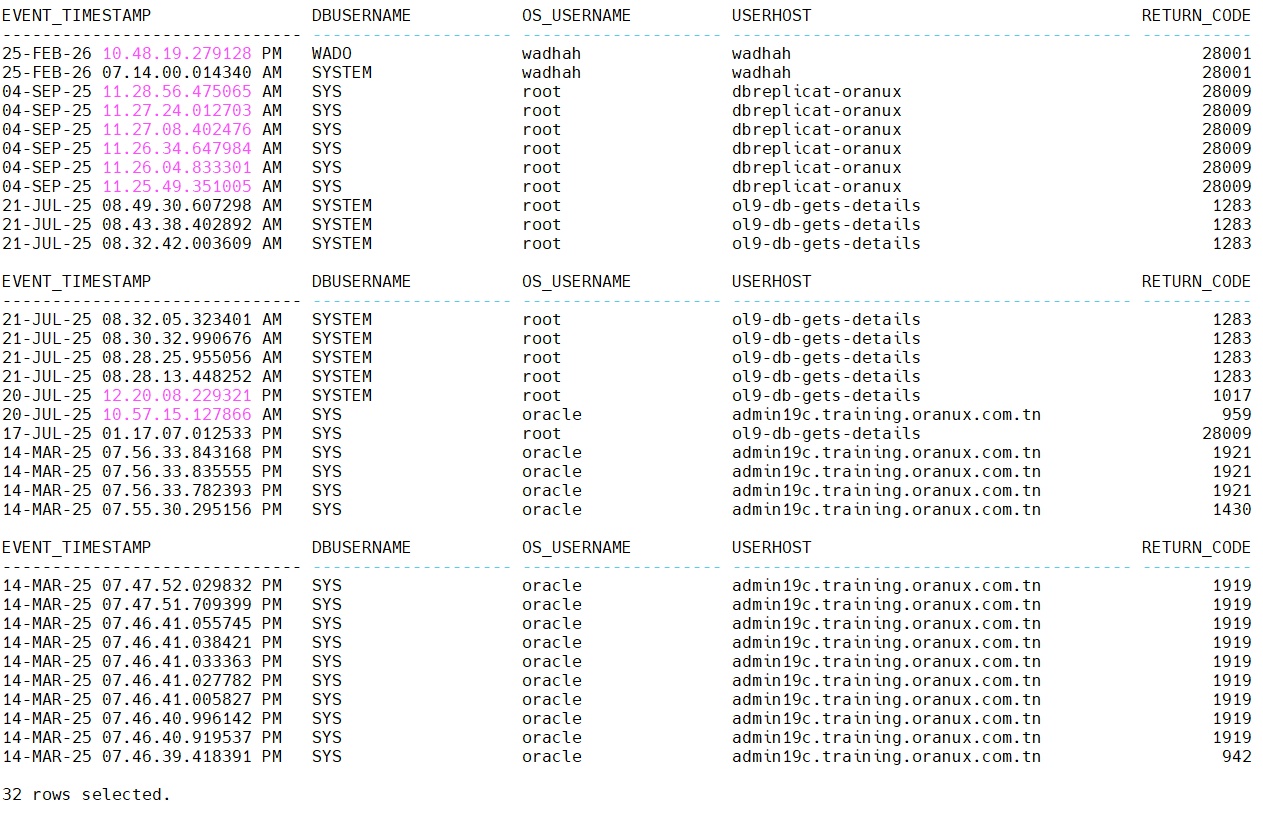
This report helps identify:
- Incorrect passwords
- Locked accounts
- Expired passwords
- Suspicious login attempts
Step 8 – Monitor SYS Operations
Administrative actions performed by SYS should be reviewed regularly.
SELECT event_timestamp, action_name, object_schema, object_name
FROM   unified_audit_trail WHERE  dbusername='SYS' ORDER BY event_timestamp DESC;
Unexpected administrative activity should always be investigated.
Step 9 – Disable Unused Policies
Over time, you may decide that a policy is no longer needed.
Disable it with:
NOAUDIT POLICY audit_user_management;
The policy remains defined but no longer generates audit records.
Security Checklist
Before considering your auditing configuration complete, verify that:
- Unified Auditing is enabled.
- Failed logins are audited.
- User management operations are audited.
- Privilege changes are audited.
- Administrative actions are reviewed regularly.
- Audit records are retained according to your organization’s policy.
- Audit reports are reviewed periodically rather than only after incidents.
Common Mistakes
During security reviews, I often encounter these issues:
- Auditing is enabled, but no one reviews the audit trail.
- Everything is audited, generating large volumes of unnecessary data.
- Audit records are never archived or purged.
- Failed login attempts are ignored.
- Privileged operations performed by administrative users are not monitored.
Auditing is effective only when the collected information is reviewed and acted upon.
Conclusion
Unified Auditing gives DBAs visibility into what is happening inside the database. It records the actions that matter most and provides valuable information for troubleshooting, security investigations, and compliance reporting.
The key is to focus on meaningful events rather than auditing every possible action. A well-designed audit strategy produces useful information without overwhelming the database or the administrator.
 Google+
 Facebook









