


Protecting Data at Rest with Transparent Data Encryption (TDE)
Imagine that a production server is decommissioned and one of its disks is accidentally sent for recycling without being properly wiped.
Or consider a backup copied to an external drive for off-site storage. If that backup falls into the wrong hands, could someone restore it and access your data?
Without encryption, the answer is often yes.
Transparent Data Encryption (TDE) protects data stored in Oracle datafiles, tempfiles, undo tablespaces, and RMAN backups by encrypting it before it is written to disk. Applications continue to work normally because Oracle automatically encrypts and decrypts the data as needed.
In this article, we’ll configure the Oracle keystore, enable TDE, encrypt a tablespace, and verify that encryption is working correctly.
What is Transparent Data Encryption?
TDE encrypts data at rest.
This means:
- Data stored in datafiles is encrypted.
- RMAN encrypted backups remain protected.
- Stolen disks cannot be read without the encryption keys.
- Applications do not need to be modified.
TDE does not encrypt network traffic. Oracle Net Encryption or TLS should be used to protect data in transit.
Before You Begin
Before enabling TDE, verify a few prerequisites.
SELECT name, open_mode FROM v$database;
Confirm that:
- The database is open.
- You have administrative privileges.
- A secure location is available for the Oracle keystore.
- You have a recent backup of the database.
Step 1 – Verify the Wallet Status
The keystore (commonly called the wallet) stores the master encryption keys.
Check its current status:
COLUMN wallet_type FORMAT A15
COLUMN status FORMAT A15

SELECT wallet_type, status, wallet_order FROM v$encryption_wallet;
Example output:

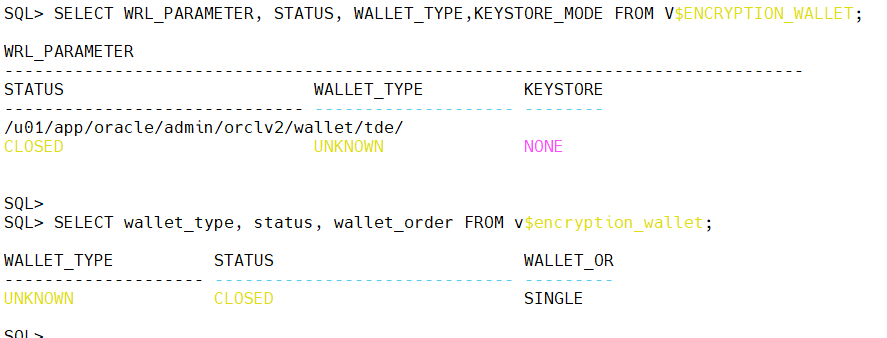
If the status is CLOSED, then means the wallet exists but is not open.
If no wallet exists, we’ll create one.
Step 2 – Configure the Wallet Location
Oracle 19c recommends using the WALLET_ROOT initialization parameter.
Check its value:
SHOW PARAMETER wallet_root;
If not set, create a directory and set the parameter wallet_root:
Example:
/u01/app/oracle/admin/orclv2/wallet
If this parameter is not configured, define it before creating the keystore.
$ mkdir -p /u01/app/oracle/admin/orclv2/wallet/tde
SQL> alter system set wallet_root='/u01/app/oracle/admin/orclv2/wallet' scope=spfile;
SQL> ALTER SYSTEM SET TDE_CONFIGURATION='KEYSTORE_CONFIGURATION=FILE' SCOPE=BOTH;
Step 3 – Create the Keystore
Create the keystore using SQL.
ADMINISTER KEY MANAGEMENT CREATE KEYSTORE '/u01/app/oracle/admin/orclv2/wallet/tde'
IDENTIFIED BY "Oranux_Wadhah_4U";
Oracle creates the wallet files in the specified directory.
Choose a strong wallet password and store it securely.
Step 4 – Open the Keystore
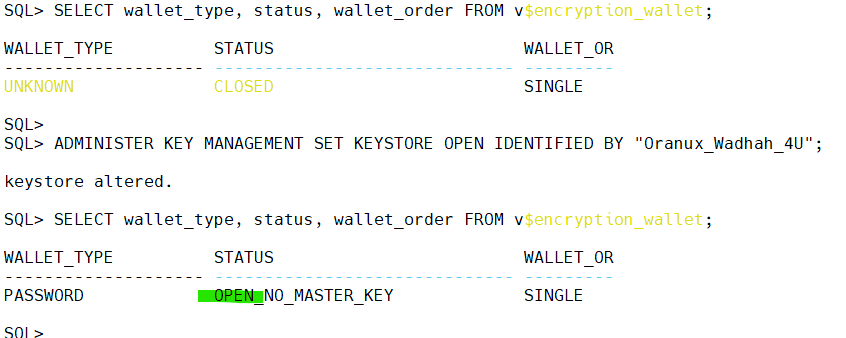
Before generating encryption keys, open the wallet.
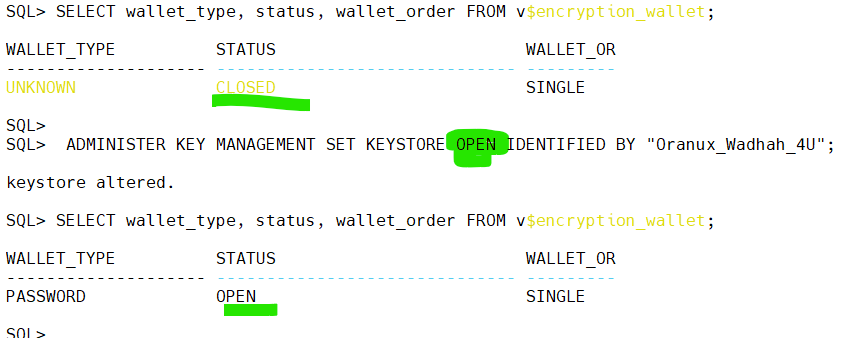
ADMINISTER KEY MANAGEMENT SET KEYSTORE OPEN IDENTIFIED BY "Oranux_Wadhah_4U";
Verify the status:
Step 5 – Create the Master Encryption Key
Generate the master key.
ADMINISTER KEY MANAGEMENT SET KEY IDENTIFIED BY "Oranux_Wadhah_4U" WITH BACKUP;

The WITH BACKUP clause creates a backup of the previous key before generating the new one. This is considered a best practice and should always be used during key management operations.
Step 6 – Encrypt a Tablespace
Rather than encrypting individual columns, Oracle recommends encrypting entire tablespaces.
Create a new encrypted tablespace:
CREATE TABLESPACE secure_data DATAFILE '/u01/app/oracle/oradata/ORCLV2/secure_data01.dbf' SIZE 500M ENCRYPTION USING 'AES256' DEFAULT STORAGE (ENCRYPT);
Any object created in this tablespace is automatically encrypted.
Step 7 – Verify Encryption
Confirm that the tablespace is encrypted.
select t.name, e.encryptionalg,e.encryptedts FROM v$encrypted_tablespaces e join v$tablespace t using(TS#);
Example output:

Step 8 – Create an Auto-Login Wallet (Optional)
Opening the wallet manually after every database restart may not be practical.
Create an auto-login wallet:
$ orapki wallet create -wallet /u01/app/oracle/admin/orclv2/wallet -auto_login

This creates the cwallet.sso file.
Use this feature only if it complies with your organization’s security policy. Some organizations require administrators to open the wallet manually after every restart.
Step 9 – Back Up the Wallet
This is one of the most important tasks.
Without the wallet, encrypted data cannot be decrypted—even if you have a valid RMAN backup.
Back up the entire wallet directory after:
- Creating the wallet.
- Generating a new master key.
- Migrating the database.
Store wallet backups separately from database backups and protect them with appropriate access controls.
Security Checklist
Before moving to the next chapter, verify that:
- The keystore is configured.
- The wallet is open.
- The master encryption key has been created.
- Sensitive tablespaces are encrypted.
- Wallet backups exist.
- Wallet access is restricted to authorized administrators.
Common Mistakes
Some of the most common TDE issues I encounter include:
- Forgetting to back up the wallet after creating a new master key.
- Storing the wallet in the same location as RMAN backups.
- Losing the wallet during server migrations.
- Assuming that network traffic is encrypted because TDE is enabled.
- Encrypting only selected columns when tablespace encryption would provide broader protection.
The last mistake often complicates administration without providing additional security.
Performance Considerations
A common concern is whether TDE affects database performance.
In modern environments, the impact is generally minimal, especially on servers equipped with CPUs that support hardware-accelerated AES encryption (AES-NI).
Before enabling TDE in production:
- Test critical workloads.
- Measure application response times.
- Verify RMAN backup performance.
- Monitor CPU utilization after encryption.
Most organizations find that the security benefits significantly outweigh the small performance overhead.
Conclusion
Transparent Data Encryption is one of the most effective ways to protect sensitive Oracle data. It helps secure information stored on disks, backups, and storage systems without requiring application changes.
The most important lesson is simple: your encrypted data is only as safe as your encryption keys. Protect the wallet, back it up after every key change, and include wallet recovery procedures in your disaster recovery plan.
 Google+
 Facebook









