


Securing Oracle RMAN Backups
A database backup is often considered the last line of defense during a disaster.
However, from a security perspective, a backup is also a copy of your production data.
A stolen backup can be as dangerous as a stolen database server.
During security reviews, I often find environments where:
- The production database is protected.
- Access to the database server is restricted.
- But RMAN backup files are stored on shared storage with weak permissions.
- Backup pieces are copied to another location without encryption.
This creates a serious security gap.
In this article, we will review how to secure Oracle RMAN backups in Oracle Database 19c.
Why RMAN Security Matters
RMAN backups may contain:
- Customer information
- Financial transactions
- Application data
- User credentials
- Database configuration
- Archived redo logs
Anyone who obtains a complete backup set may attempt to restore it elsewhere and access the data.
A secure backup strategy must protect:
- The backup files.
- The encryption keys.
- Access to RMAN commands.
- Backup storage permissions.
- Backup transfer processes.
Step 1 – Review Current RMAN Configuration
Before changing anything, review the current RMAN configuration.
Connect to RMAN:
rman target /
Run:
SHOW ALL;
Example output:
CONFIGURE RETENTION POLICY TO REDUNDANCY 1;

CONFIGURE DEVICE TYPE DISK PARALLELISM 4;

CONFIGURE CONTROLFILE AUTOBACKUP OFF;
Pay attention to:
- Retention policy
- Encryption configuration
- Control file autobackup
- Backup optimization
- Compression settings
Step 2 – Enable Control File Autobackup
The control file contains critical database metadata:
- Datafile information
- Tablespace structure
- RMAN repository information
- Backup history
Enable automatic backup:
CONFIGURE CONTROLFILE AUTOBACKUP ON;
Verify:
SHOW CONTROLFILE AUTOBACKUP;
Example:
CONFIGURE CONTROLFILE AUTOBACKUP ON;
Step 3 – Encrypt RMAN Backups
Oracle RMAN supports backup encryption using:
- Transparent encryption
- Password encryption
- Dual-mode encryption
The recommended approach in most enterprise environments is transparent encryption using TDE.
Transparent RMAN Encryption
Verify encryption:

Enable encryption:
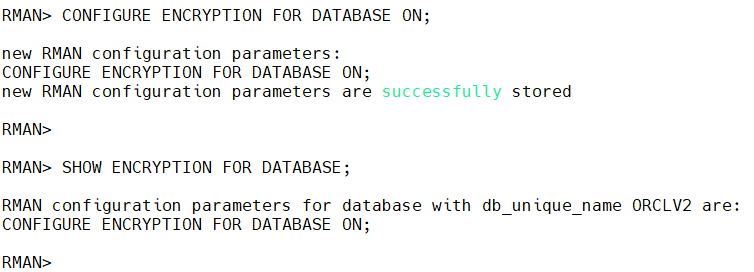
Now RMAN backups are encrypted automatically using the database keystore.
Step 4 – Perform an Encrypted Backup
Example full database backup:
BACKUP DATABASE PLUS ARCHIVELOG;
RMAN output will show:
channel ORA_DISK_1:
starting encrypted backup
The backup pieces are encrypted before being written to disk.
Step 5 – Verify Backup Encryption
After completing the backup, verify the backup status.
LIST BACKUP SUMMARY;
For detailed information:
LIST BACKUP OF DATABASE;
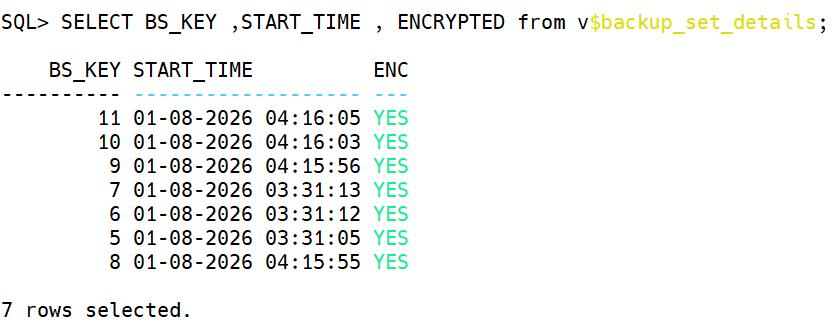
You can also query:
SQL> alter session set nls_date_format='dd-mm-yyyy hh24:mi:ss';
SQL> SELECT BS_KEY ,START_TIME , ENCRYPTED from v$backup_set_details;
Example:
Step 6 – Password-Based Backup Encryption
Sometimes backups must be restored on another environment where the original wallet is unavailable.
In this case, password encryption can be used.
Example:
SET ENCRYPTION ON IDENTIFIED BY "BackupPassword";
Then:
BACKUP DATABASE;
During restore:
SET DECRYPTION IDENTIFIED BY "BackupPassword";
Important
Password-based encryption introduces operational challenges:
- Password management
- Secure storage
- Recovery procedures
Use it only when required.
Step 7 – Protect Backup Storage
Encryption alone is not enough.
The operating system permissions must also be secured.
Example:
ls -lh /backup/rman
Bad example:
-rwxrwxrwx backup01.bkp
Everyone can read the backup.
Better:
chmod 700 /backup/rman

chown oracle:oinstall /backup/rman
Recommended permissions:
Owner:
    oracle

Group:
    oinstall

Permissions:
    700 or 750
Step 8 – Secure RMAN Catalog Access
If you use an RMAN catalog database, protect it like any production database.
Review catalog users:
SELECT username, account_status FROM dba_users;
Avoid:
- Shared catalog accounts
- Excessive privileges
- Unencrypted connections
Step 9 – Validate Backup Recoverability
A backup that cannot be restored is not a backup.
Perform regular validation:
VALIDATE DATABASE;
Validate backup files:
VALIDATE BACKUPSET ALL;
Step 10 – Test a Real Recovery
A security strategy is incomplete without recovery testing.
Examples:
Restore control file
RESTORE CONTROLFILE FROM AUTOBACKUP;
Restore database
RESTORE DATABASE;

RECOVER DATABASE;
The objective is not only to confirm that backups exist but that the complete recovery process works.
Step 11 – Backup Wallet and Encryption Keys
If your backups use TDE encryption, the wallet is mandatory.
The following files are critical:
ewallet.p12

cwallet.sso
Example:
ls -l $ORACLE_BASE/admin/orclv2/wallet
Backup the wallet:
cp -p $ORACLE_BASE/admin/orclv2/wallet/* /secure_wallet_backup/
Store wallet backups separately from database backups.
RMAN Security Checklist
Before considering backup security complete:
| Check | Recommended |
|---|---|
| Control file autobackup | Enabled |
| RMAN encryption | Enabled |
| Backup directory protected | Yes |
| Wallet backup available | Yes |
| Backup restore tested | Yes |
| Backup access audited | Yes |
| Retention policy defined | Yes |
Common Mistakes
During production audits, I frequently see:
1. Encrypted database but unencrypted backups
TDE protects live data, but old backups may still contain readable information.
2. No wallet backup
Encrypted backups become useless without the encryption keys.
3. No restore testing
A successful backup job does not guarantee recoverability.
4. Backup files accessible by many users
A database backup should never have open permissions.
5. Keeping backups forever
Old backups increase the amount of sensitive data that must be protected.
Performance Considerations
RMAN encryption has some CPU overhead.
Before enabling encryption everywhere:
- Test backup duration.
- Monitor CPU usage.
- Evaluate compression order.
Recommended:
CONFIGURE COMPRESSION ALGORITHM 'MEDIUM';
For many environments, the combination:
Compression + Encryption
provides a good balance between storage savings and security.
Conclusion
Database security does not stop at the database instance. Backups are a copy of your most valuable asset and must receive the same level of protection.
A secure Oracle backup strategy requires:
- Encryption
- Access control
- Wallet protection
- Regular validation
- Recovery testing
The best backup is not only the one that exists—it is the one that can be securely restored when you need it.
 Google+
 Facebook









