


Securing Oracle Listener and SQL*Net
When DBAs think about database security, they often focus on users, passwords, and privileges. However, before anyone can authenticate, they must first connect to the database through Oracle Net.
That makes the listener your first line of defense.
A poorly configured listener won’t necessarily expose your data directly, but it can reveal information about your environment, accept registrations from unauthorized hosts, or leave the database vulnerable to denial-of-service and configuration attacks.
In this article, we’ll review the most important listener security settings and learn how to verify them.
Understanding the Oracle Listener
The Oracle Listener is a background process that listens for incoming client connection requests and directs them to the appropriate database instance.
Without a running listener, remote users cannot connect.
The default listener usually listens on TCP port 1521.
You can verify its status with:
lsnrctl status
A typical output begins like this:
$ lsnrctl status

LSNRCTL for Linux: Version 19.0.0.0.0 - Production on 13-JUL-2026 17:00:28

Copyright (c) 1991, 2019, Oracle.  All rights reserved.

Connecting to (DESCRIPTION=(ADDRESS=(PROTOCOL=TCP)(HOST=admin19c.training.oranux.com.tn)(PORT=1521)))
STATUS of the LISTENER
------------------------
Alias                     LISTENER
Version                   TNSLSNR for Linux: Version 19.0.0.0.0 - Production
Start Date                13-JUL-2026 13:40:26
Uptime                    0 days 3 hr. 20 min. 1 sec
Trace Level               off
Security                  ON: Local OS Authentication
SNMP                      OFF
Listener Parameter File   /u01/app/oracle/product/19.3.0/dbhome_1/network/admin/listener.ora
Listener Log File         /u01/app/oracle/diag/tnslsnr/admin19c/listener/alert/log.xml
Listening Endpoints Summary...
  (DESCRIPTION=(ADDRESS=(PROTOCOL=tcp)(HOST=admin19c.training.oranux.com.tn)(PORT=1521)))
  (DESCRIPTION=(ADDRESS=(PROTOCOL=ipc)(KEY=EXTPROC1521)))
Before changing any configuration, always save a backup of the existing listener configuration.
cd $ORACLE_HOME/network/admin

cp listener.ora listener.ora.bak
cp sqlnet.ora sqlnet.ora.bak
Review the Current Listener Configuration
Open the configuration file.
vi $ORACLE_HOME/network/admin/listener.ora
A simple configuration might look like this:
LISTENER =
 (DESCRIPTION_LIST =
   (DESCRIPTION =
     (ADDRESS=(PROTOCOL=TCP)(HOST=admin19c.training.oranux.com.tn)(PORT=1521))
   )
 )
At first, this looks fine. However, there are several security improvements we can make.
Enable Listener Administration Protection
By default, listener parameters can be modified dynamically.
To prevent unauthorized runtime changes, enable administrative restrictions.
ADMIN_RESTRICTIONS_LISTENER=ON
Restart the listener.
lsnrctl stop
lsnrctl start
Verify the setting.
lsnrctl status
Why is this important?
When administrative restrictions are enabled, configuration changes must be made in listener.ora instead of being applied dynamically through listener commands. This reduces the risk of accidental or unauthorized modifications.
Enable Valid Node Checking
One of the simplest ways to reduce unnecessary connection attempts is to allow service registration only from trusted servers.
Add the following entries to listener.ora:
VALID_NODE_CHECKING_REGISTRATION_LISTENER = SUBNET

REGISTRATION_INVITED_NODES_LISTENER =
(
192.168.10.10,
192.168.10.11
)
In a single-instance environment, this typically includes only the database server.
In a RAC environment, include every cluster node and any SCAN listeners involved in service registration.
Reload the configuration.
lsnrctl reload
This setting helps prevent service registration requests from unexpected systems.
Enable Listener Logging
Listener logs are invaluable when investigating connection problems or suspicious activity.
Check whether logging is enabled.
lsnrctl status
You should see something similar to:
Listener Log File /u01/app/oracle/diag/tnslsnr/admin19c/listener/alert/log.xml
To review recent connection activity:
tail -f $ORACLE_BASE/diag/tnslsnr/admin19c/listener/trace/listener.log
Look for repeated connection failures, unknown services, or unusual client addresses.
Check for Unknown Services
The listener should advertise only the services you expect.
Run:
lsnrctl services
Review the output carefully.
Questions to ask:
- Are all listed services expected?
- Are there old databases still registered?
- Are test databases visible?
- Are duplicate services present?
Removing obsolete services reduces confusion and simplifies administration.
Verify Dynamic Service Registration
Database instances normally register themselves automatically with the listener.
Confirm the configuration:
SHOW PARAMETER local_listener;
SHOW PARAMETER remote_listener;
If either parameter contains an incorrect value, services may fail to register or register with the wrong listener.
Enable Oracle Net Encryption
By default, Oracle Net traffic may not be encrypted.
To require native encryption, edit sqlnet.ora on both the server and client.
SQLNET.ENCRYPTION_SERVER = REQUIRED
SQLNET.ENCRYPTION_TYPES_SERVER = (AES256)
SQLNET.CRYPTO_CHECKSUM_SERVER = REQUIRED
SQLNET.CRYPTO_CHECKSUM_TYPES_SERVER = (SHA512)
These settings provide:
- AES-256 encryption for network traffic.
- SHA-512 integrity checks to detect tampering.
- Protection against packet sniffing on untrusted networks.
After updating the configuration, restart the listener and reconnect from a client.
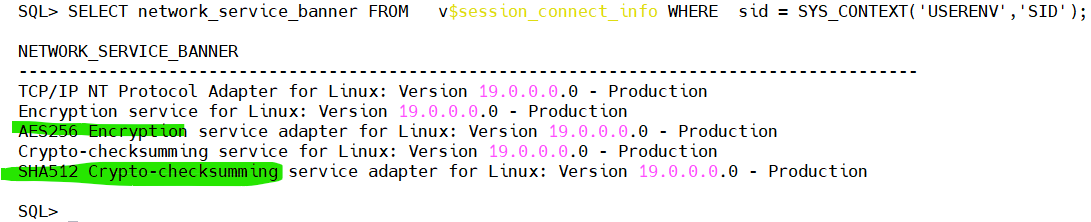
Verify Encryption
Once a client is connected, confirm that encryption is active.
COLUMN network_service_banner FORMAT A80

SELECT network_service_banner
FROM   v$session_connect_info
WHERE  sid = SYS_CONTEXT('USERENV','SID');
Example output:
AES256 Encryption service adapter
SHA512 Crypto-checksumming service adapter
If these entries are missing, the connection is not using Oracle Net encryption.
Audit Listener Configuration
The following checklist can be used during a security review.
| Check | Recommended |
|---|---|
| Listener logging enabled | Yes |
| ADMIN_RESTRICTIONS enabled | Yes |
| Valid node checking configured | Yes |
| Unknown services removed | Yes |
| Oracle Net encryption enabled | Yes |
| Crypto checksums enabled | Yes |
| Listener configuration backed up | Yes |
Common Mistakes
Some issues appear repeatedly during Oracle security assessments:
- Leaving the listener with its default configuration after installation.
- Disabling listener logging to save disk space.
- Exposing development or test services on production listeners.
- Assuming Oracle Net encryption is enabled without verifying it.
- Forgetting to update listener settings after adding or removing databases.
These problems are easy to avoid with regular reviews.
Conclusion
The Oracle Listener is often the first component that clients interact with, making it a critical part of your database security strategy. A few configuration changes—combined with regular reviews of listener logs and registered services—can significantly improve your security posture without affecting normal database operations.
In the next article, we’ll focus on authentication and password policies. We’ll configure secure profiles, enforce password complexity, limit failed login attempts, and review Oracle’s password verification functions to strengthen user authentication before moving on to advanced topics like auditing and Transparent Data Encryption (TDE).
 Google+
 Facebook









